Leaderboard



Popular Content
Showing content with the highest reputation on 07/21/25 in all areas
-
Did I miss this somewhere, or is it still not implemented? Considering that we are relying on your website security to protect our systems, I would have considered MFA a priority.1 point
-
I prefer the left side. The right one is nice-ish, but it looks like a bad port from a phone app's settings screen. The distance shown on the right one between the labels and toggles decouple them from one another, you have to start counting from the top to make sure you select the correct toggle - I want to turn Blabla on, it's 7th from the top, time to start counting the toggles ... 1, 2, 3, 4 ... You should not need to relay on sliding your finger perfictaly level across the screen with out any deviation to select the correct toggle. That's bad UI, that's bad design. Keep the goal in mind. The appeal of HexOS is simplification and ease of use in creating and managing a NAS. The Right is pretty, but with the distances that the toggles are at in that picture, you are significantly increasing the chance of toggling on/off the wrong thing. It'll get annoying for the sake of form and forgetting that is needs to function as an easy to use UI. Phones can use the right one because of the smaller screen size, but it dose not work well on larger screens like on a desktop or laptop. I am reminded of the favored saying of my middle school English teacher: K.I.S.S - Keep It Simple Stupe... ndous. Yea, stupendous, that is definitely how that ended. Having the toggles on the left with the label just next to it removes the chances of accidentally toggling the wrong thing. Using the indentations as shown in the image is similar to the way file structures and categorization trees are depicted. It's a familiar design that works, looks good, it's space efficient, and dose not create a lot of empty dead space for no good reason.1 point
-
Right side but the toggles should closer to the words like they are on the Left version. half the width of a monitor is too far away1 point
-
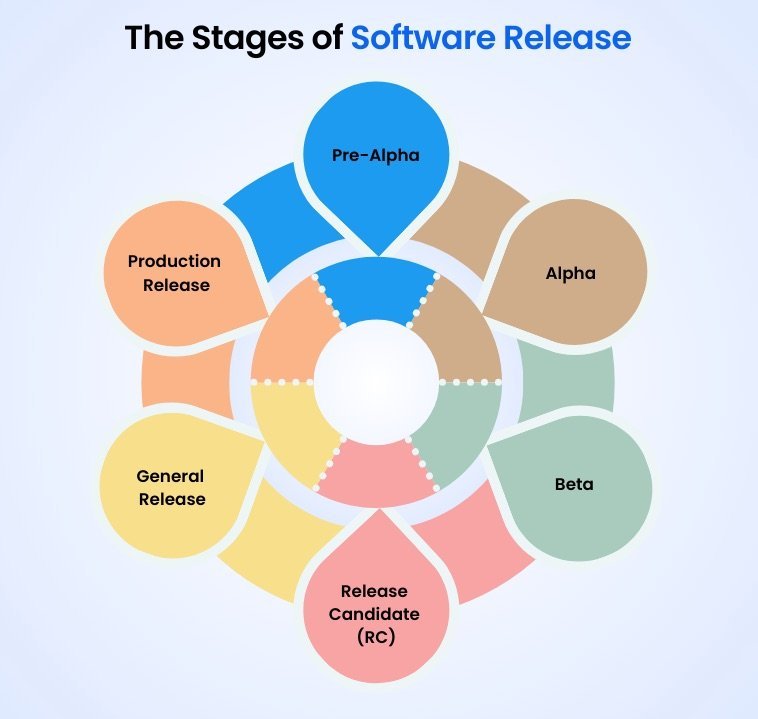
Great job on the FAQ HexOS as I think it covers the bulk of the initial potholes people could step in. I making this post to remind people this is a "Beta" software. By definition that means it is far from complete or even ready for prime time / public release. The whole point of a beta test pool is to provides developers with valuable insights into the user experience, which they can use to make improvements before the product is released to all users. (in other words, it's absolutely not going to work perfectly, nor should you expect it to). The reason we all got it for $99 is (by default) we agreed to find all the faults in the current state of the software. Although HexOS is built on TruNAS Scale, it is NOT TrueNAS Scale. Please keep that in mind when proving your feedback. Also, it should go without saying, but I'll state it outloud, It is highly recommended and should be common sense/practice to not take risks with your most important data. If you only have one NAS, and every important document, photo and video that you own in the world is on that, I would suggest you wait before you install the beta software, and or be sure to back up those files somewhere easily accessible "off the nas". Lastly, regardless, if your current nas manufacture, allows installation of third-party software or not, you should always make a back up or clone of your original/current boot drive in such a way that if the unit completely crashed, you could re-insert a USB/SSD or log in some other way (ssh, terminal, etc.) to restore it back to its original operating software. These are good practices to have with any software changes, but even more critical in testing beta software. If you don't have more than one nas to test this on, or a way to backup your data off the nas, then I would recommend (like so many have chosen to do) that you sit tight on your current license, and hold off installing in till the software is further down the road or all the way to "Production Release" (see attached image.
 1 point