Leaderboard




Popular Content
Showing content with the highest reputation on 01/10/25 in all areas
-
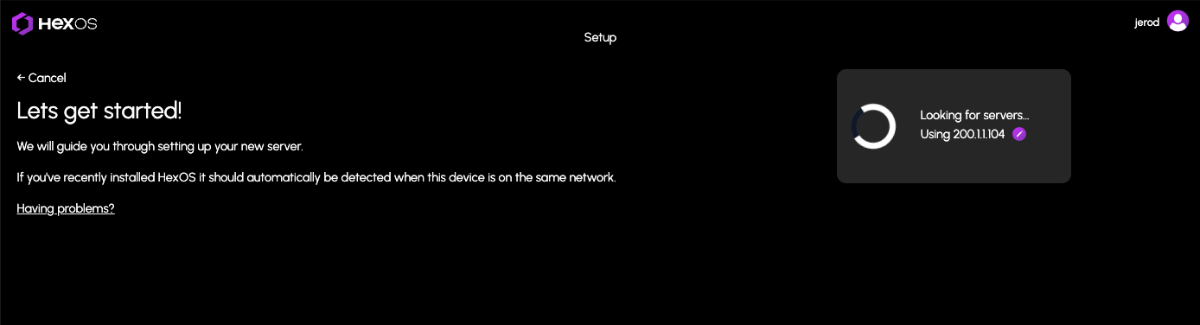
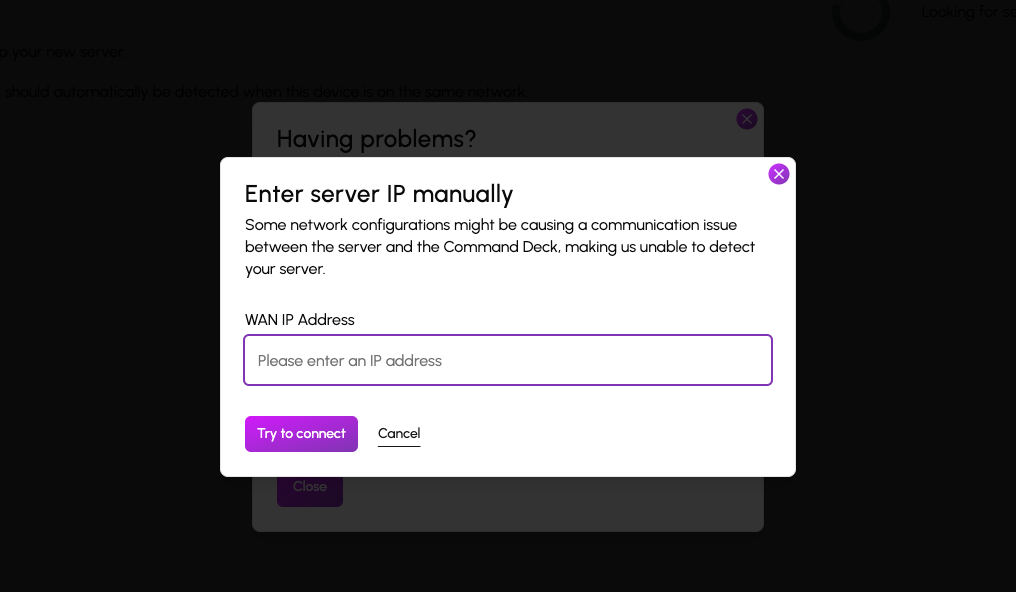
Command Deck Update Notification (01/08/2025) We are releasing an update today. You will automatically receive these changes on your next visit to the Command Deck. For users who are actively connected, please note there may be a brief downtime of minute or two. This update includes an important feature for users who have previously encountered issues claiming their HexOS server due to certain network configurations. These configurations caused communication problems between the server and the Command Deck, preventing automatic server detection after installation due to an IP mismatch. Manual WAN IP Specification You can now manually specify the WAN IP address to assist in the server discovery process when claiming your server. Additionally, we’ve made several minor improvements, including: Additional confirmations for destructive actions to help avoid accidental operations Improved grammar and spelling throughout Clearer instructions for accessing the TrueNAS UI from Settings Better logging to help dev/user experience If you encounter any issues, try clearing your cache first to be sure you are using the latest version: Instructions for clearing your cache
 2 points
 -
Hey Jerod, Im not getting an option to update on my dashboard. When i go to notifications its saying I have an update and to go to settings. but nothing is showing up on my screen(i cleared cache and reloaded). Everything looks the same on the UI side. Is it possible it auto updated? Bare in mind I dont know how to use linux so i havent look any further into it other than the web ui. thank you,2 points
-
There was:
1 point
-
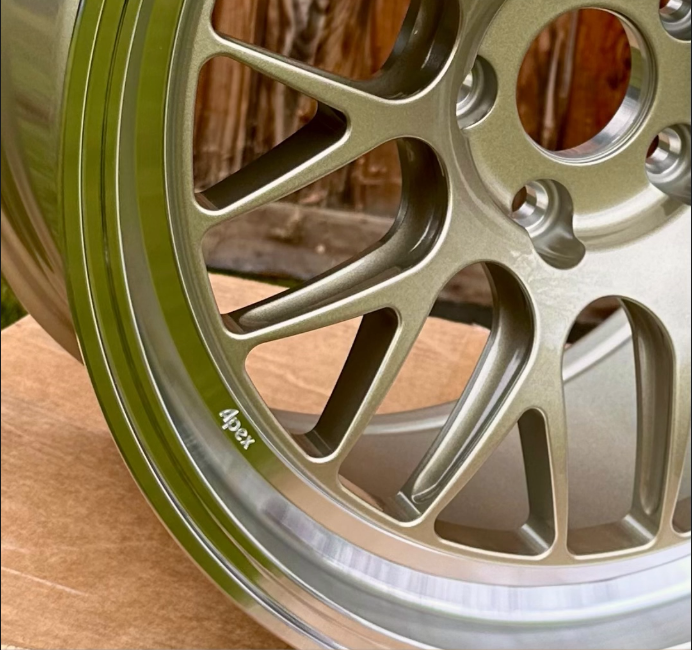
Can't wait for spring to come sooner. Wheels for the M3 showed up, right as winter hit, and I just get to stare at them for now.
1 point
-
This may not be the right place to make this argument, and I fully understand your plans may be firm and I am wasting my time by saying this. However, I would argue you almost certainly have a captive base of enthusiasts beta-testing your product rather than a high percentage of normies. (I apologize for that term; I can't think of a better word and don't mean it as an insult to anyone.) Given that assumption, it would seem that the phases are almost backward in an ideal world. Enthusiasts are likely going to go the extra distance to get what they want running on their NAS whether they have a HexOS way of doing it, or if they have to do it from TrueNAS. It would make more sense to have the custom docker/deployment script loader available first, with a suitable warning of dragons and dangers ahead, and provide an open-source example of a curated script so the community can start making and sharing custom app deployment scripts the HexOS way. Maybe have a forum section for sharing and collaborating/improving the scripts. Then you would already have a portfolio of proven community developers once you are ready to recruit, and (if you so choose) you can give out a "HexOS stamp of approval" to well-designed community app deployments. Finally, for the popular yet difficult apps that require a demanding configuration/deployment, work on curating them yourself later. I understand that you might need to make a few curated apps to define the "HexOS" way of app deployment and to develop a best practices guide for the community before allowing custom deployments, but by just opening the door, I suspect you will have a very nice catalog before you know it. Furthermore, I suspect the community will naturally develop deployments for popular apps you may already be internally planning on curating, therefore, saving time and money from having to develop them yourself. This would ultimately allow more development budget for critical features/integrations. To be clear, if HexOS were in wide release, I would completely agree with your planned phases. However, because this is still a beta, I think it would be advantageous for HexOS to foster community development sooner rather than later.1 point
-
I think that's a great idea starting with plex since it's so popular and complex, even if I have no intention of using it. lol but I then am curious what was the reasoning behind immich? Was that super easy? I'm thinking If Immich is super easy it must've been the first one, and then yous went after plex for reasons stated. Got to walk before you can run.1 point
-
Right now the team is entirely focused on bug fixes, QoL updates, and pool customization. When we go to shift focus onto our next major feature, we will also select another app for curation (maybe a few). We specifically started with Plex because it’s honestly A) one of the most popular and B) one of the most demanding for configuration. By starting with the hard stuff, we can really focus on honing in support and getting that experience just perfect as well as set a template for all future apps to come. As an example of this, we are very focused on improving the plex experience already. There are issues with remote access, resource assignment, and GPU-assisted transcoding. So those types of things will likely be addressed (at least in part) before we add another curated app. That being said, I am hopeful to really start cranking on a wider App Library sooner than later. Apps are one of the most important features of the product.1 point
-
Additionally, i managed to get HA OS up and running in a VM already using THIS amazing guide on the HA Forum for anyone looking to get set up now.1 point
-
Timing is perfect for this topic. I appreciate you all waiting until 2025 to bring this up. The road to 1.0 blog post was just a way to set our targets out there. We didn't communicate a specific timeline because we honestly had no idea how much to estimate we would sell at launch, which would directly in turn impact our ability to expand the team and impact our timelines. We just felt that, conservatively, we would do well enough to deliver the blog post roadmap in 2025....yeah....we had no idea what was about to happen ;-). Beat our expectations by about 5x. With the success we've had, we just onboarded three new people to the company in the past 30 days, with a goal of bringing on at least two more developers in 2025 as well and potentially a few other admin hires. This has completely thrown our previous "back of the napkin" roadmap out the window. Let's just say, we're not going to be talking about features just for 1.0 anymore. You guys have given us enough runway to plot out PAST 1.0. Give us a little more time to get our bearings as we onboard new staff, prepare new development environments, implement new systems, and role out our first software updates. More communication coming soon.1 point
-
how will HexOS receive updates will we need to reinstall until its out of beta or will it start prompting us to update it via the cloud dashboard?1 point
-
UPDATE: As of 4/17/26, we have updated the ISO installer to run on version 25.10.3 of TrueNAS SCALE. Existing users should NOT reinstall to get this version. You can update from within the Activity card on the Dashboard (or the Notification). Hello and thank you for joining the HexOS beta program! You are an elite and vital part of this project and your participation is greatly appreciated. This post contains all the information you will need to get started with HexOS and how to communicate with our team during your beta experience. Disclaimer Beta Products, Software, and any related Services are still in development, and therefore, you are advised to safeguard important data, to use caution, and not to rely in any way on the correct functioning or performance of the products, software, or any related services. Beta Products and Services are provided to you “AS IS”, without any warranty whatsoever. Expectations During your participation in the beta, we expect you to do the obvious: use and test the software. But we also expect you to communicate with us when things don’t go right or if you’re having trouble. Please post feedback and let us know about your experiences, good and bad. That being said, please remember that this is beta software and early access. HexOS has a long and healthy roadmap ahead. Quickstart Guide For those that just want to get started, here’s the TLDR: NEW: We have released our own imaging tool for creating the OS installation media on a USB stick. You can find it here in our docs; https://docs.hexos.com/getting-started/installation/InstallGuide Alternatively, you can download the ISO here: https://downloads.hexos.com/TrueNAS-SCALE-25.10.7-HexOS.iso or https://hexos-downloads.sfo3.cdn.digitaloceanspaces.com/TrueNAS-SCALE-25.10.7-HexOS.iso (SHA256 Checksum: e551911445c95c1943e6638091896f34d2d423900cccd688ac09d811e78ed450) Use a tool such as Balena Etcher to image a USB flash device with the ISO. Boot your server from the flash device and install the OS to preferably an SSD. When given the option, opt to create the admin password in the installer (do not select the option to "Configure using WebUI"). Remove the flash device and reboot your server when the install is complete. From another device (mobile, tablet, desktop) that is on the same LAN as your server, login to https://deck.hexos.com using your HexOS credentials. Follow the instructions to complete your server configuration. NOTE: As of the 24.10.2.2 build of this ISO, configuring the admin password via the webUI option has been removed from the installer. However, if you select to create an admin password, but then attempt to "cancel" that process, the ISO will proceed with an installation with no admin password set. This is a known bug and the TrueNAS team will be addressing this in a future update to the ISO. Just don't cancel out of creating the admin password in the installer ;-). Hardware Requirements Booting HexOS is designed to support a wide variety of x86 hardware (Intel or AMD). The minimum requirements are a 2-core 64-bit CPU, 8GB of memory, and a 16GB or larger SSD boot device. However, depending on your needs for performance and applications, more resources may be required. Storage Pools Pools are made up of storage devices based on size and type (HDDs vs. SSDs). Storage devices in each pool need to be roughly the same size*. The OS boot device cannot be a part of a pool. Expandable pools require a minimum of 3 devices and can be grown one device at a time. Non-expandable pools can be created with 2 devices. Initial pool width should not exceed 8 devices. Maximum expanded pool width should not exceed 12 devices. At least one storage pool must be created to use HexOS. *In the event of slight variations (e.g. 240GB and 256GB), devices can be grouped, but total capacity for the pool will sacrifice the larger device’s excess storage. Build Recommendations HexOS has been designed so that a relatively modern PC can be easily transformed into a very viable home server. This means using standard HDDs/SSDs and using onboard controllers for storage/networking. However, since we’re based on TrueNAS, our hardware support is actually rather vast. For more detailed hardware recommendations for advanced builds, please refer to the TrueNAS SCALE Hardware Guide. Installing in a VM As HexOS is based on TrueNAS SCALE, it can be installed as a virtual machine as well. While the process should be fairly self-explanatory, please see the TrueNAS SCALE documentation for additional instructions on VM installation. Setup and Configuration Once the OS has been installed and rebooted, you will use a web browser on the same network as your server to register your system and complete the setup process. This can be a PC, tablet, or mobile device. Using a capable browser, login to https://deck.hexos.com. Beta 1 Features Our first release is focused on providing a streamlined user experience for setup and configuration and laying the framework for what’s to come. The main features of Beta 1 include: Setup and configuration wizard Configure your home server in minutes with ease. Analyze system health, with warnings for SMR HDDs. Auto-configure storage pools to safeguard against device failures. Securely manage your server remotely via Command Deck. Storage device management Detect error states and conditions and report through the dashboard Highlight individual storage devices and their respective faults Replace devices from storage pools due to failure or preventative maintenance Expand pools as little as one device at a time Folders and users Create and share folders over your local network. Easily manage permissions for secure access. Apps One-click deploy Immich as a personal photo library app. One-click deploy Plex as a home media server. Automatic folder creation for app storage. Dashboard / UI Access key statistics like CPU, memory, network, and storage usage at a glance. Monitor storage health and see alerts for errors or degraded pools. Manage multiple servers from a single, unified interface. Enjoy mobile-responsive design for effortless navigation on any device.1 point
-
For detailed installation instructions, please refer to this thread: Illustrated Installation Guide - START HERE! =)1 point
-
so will updating truenas scale break hex os - like can we do it and it might be fine, or dont do it.1 point
-
Pi-hole, and a NVR solution (Looking at you, scrypted!)1 point