Leaderboard




Popular Content
Showing content with the highest reputation on 04/04/26 in Posts
-
Hey, you can't leave a cliffhanger like! Don't friends normally share bigger impacts with one another? 😁3 points
-
We have no editorial input or control over the LTT videos. We don't pay for sponsorship or anything like that either. The fact that it came out this weekend was pure happenschance. We are looking into the SMB issue and will see what we can do from our side to address. Tbh, what we have planned for the rest of the year is going to have an even bigger impact than the 1.0 release in my mind. With respect to price, an announcement about our scheduling pricing changes will be coming soon.3 points
-
All we can say at this point is we are slowing rolling out local to new users. Over 400 so far have been migrated.2 points
-
Hey, 1 account can have multiple licenses. If you want to be your own buddy backup you can buy a second license with your account, if you have a buddy who wants to be your backup buddy, that person can make an own account and buy it's own licence. However you cannot transfer a licence from one account to another account. I hope this was understandable1 point
-
Hey, I have a couple questions. After watching the latest LTT video about needing a NAS, did you ask for a little publicity now that you are in the 1.0 neighborhood? I have NO problem if you did but i'm not sure they really did the product a favor. Yes the setup overall show the simplicity but the SMB issue is pretty common and pretty troubling. Plouffe did say it was a Microsoft issue but most people don't have many people willing to bail you out. And Microsoft security setting are not something you screw with if you don't have real experience. You probably could have done without that "I get the key. So I didn't pay for it.' comment as well. Oh well, any publicity is good publicity right? The video was a little weird to watch sine it must have been filmed a few months ago. So now that you have reached this point is the price going up? That would put you right up there with the lifetime Unraid price. You have been warning folks all along it would happen so we can't ack surprised.1 point
-
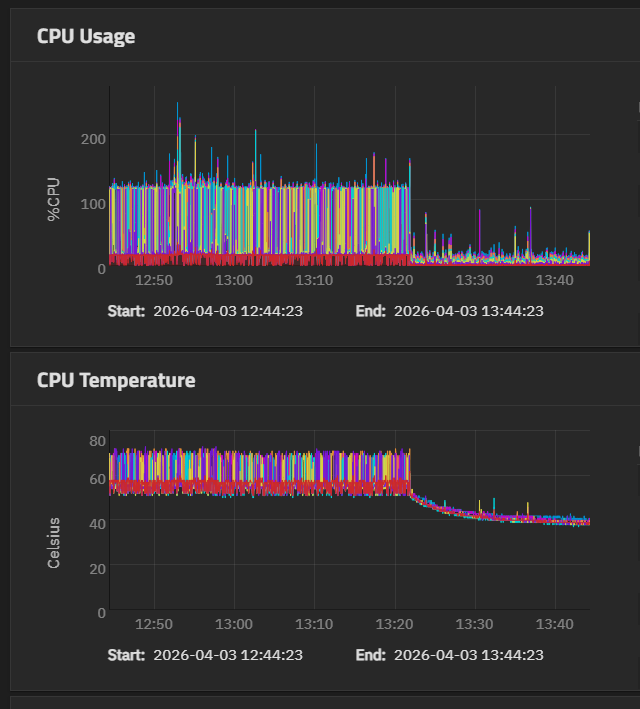
Genius! Thank you so much for this, genuinely. Whatever this bug is has been preventing me from upgrading for months. I'd check updates once in a while and then just regress and go back to running 25.04. As soon as I hit ENTER key on the last line of the script, everything settled down immediately. I think you can tell at what time the script was entered lol.
 1 point
 -
We've added everyone from our list. We'll start to migrate people based on the order of purchase to local UI.1 point
-
I bought my license the day it became available but I've been waiting on this release to install. My server has just been sitting in the rack waiting. Excited to finally try it out, hopefully the download becomes available soon.1 point
-
Just my 2 cents, but for me buddy backup is more important, since I have 2 Hexos servers and I can be my very own buddy and I'm not planning on every using a cloud service as storage (smartphone stuff doesn't count, you don't really have much of a choice there 😉 ) Additional Buddy Backup was one of the promoted features and there have been quite a few people asking about it since the initial release of the beta. Cloud backup on the other hand was not really promoted and as @Todd Miller mentioned there were far less requests for it so far. Therefore likely why they prioritised Buddy Backup over cloud storage. So from a commercial point of view Buddy Backup is a stronger selling point that sets Hexos appart from other NAS solutions. I'm not saying that cloud storage support should not be done, but at least this (forum) part of the community is currently more interested in buddy backup.1 point
-
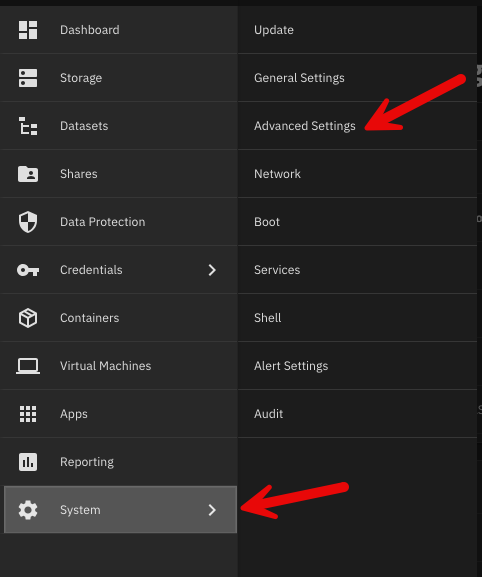
As an update to the guide above: On step 2 and step 15, the interface has changed where to export and upload the configuration file as of version 25.10.2.1. The new location is here: System > Advanced Settings.
1 point
-
I did say BY end of April ;-). Truth is we have been pretty much right there aside from a few issues, but the big one was the availability of HexOS Local. But we decided yesterday that we can still call this 1.0 and roll out Local to everyone over time. The local project has to be rolled out more slowly as we have SSL cert issuance limits right now.1 point
-
It has gone rather quiet. I thought I would see more general discussion or the odd update. Unless I've missed something the most recent update has been a revision to the blog introducing hex OS local originally published 25th Nov 2025 and updated 23rd Jan earlier this year. I'm not complaining before anyone jumps on me. I've been happily running the beta since originally hearing about it on LTT and couldn't have built my NAS without it (not with my skillset at the time anyway). So far it's been running flawlessly, shares and apps have been a breeze to set up, and the minor jobs I've had to do myself such as setting up a VM in truenas for Homeassistant have been recognised and appear on the Hex OS dashboard. I know it's possible I might have to start again from scratch but fingers crossed there is an update path that doesn't break everything. I have on occasion had to re-adopt the server on the dashboard (probably my fault) but it's only happened a couple of times. To avoid wiping everything I just popped out my drives, re-adopted, shut down, popped the drives back in and everything came back when I restarted. If there isn't a simple update to 1.0 with any luck a similar workaround will prevent data loss.1 point
-
You rock, interesting fact, Chat GPT highlighted this post. Giving you Credit because i was also trying to fix this.1 point
-
Try the following. Most likely this will fix your issue. If this does, TrueNAS has a fix that is in it's next update. Login to TrueNAS interface. Left side select "system". Then after screen refreshes select "shell" from the list. Paste in the following command. *Can't use normal short cuts* Will need to use Shift + Insert Key for pasting. sudo python /usr/lib/python3/dist-packages/middlewared/scripts/vendor_service.py If that works within about 1 min you should be able to go to deck.hexos.com and see your server or claim it. You might need to run this after reboots. Let us know if this works. Thank you,1 point