All Activity
- Past hour
-
 KReinartz83 joined the community
 - Today
-
 Disio joined the community
 -
 Bellwood99 joined the community
 -
Well you haven't told us about any of the problems you are facing, so it's impossible for us to say. But if you don't have anything important on your system right now, then by all means reinstall the newest HexOS version and try to reinstall your apps from the beginning. If you are still facing issues then post them here on the forums and we will likely be able to help you out 😊
-
 Gridbug joined the community
 -
 Srcko7 joined the community
 -
 TRDKyle joined the community
 -
 sadashi22 joined the community
 -
I have not been able to get HEXOS working the way i would like in the past year or so All i want it a photo backup (Immich) and if im able to have a plex server running as well i would love that. I inisaly tried to use a old computer but i have had so many problems that i thought were hardwear problems so i baught a new system just for HEXOS and i thought it would just work. I did have a flood in my basment and had to turn everything off for the beter part of 4 months well it was getting fixed. I was all excited thiking alot would have changed in hex os in that time frame but its worse now for me then it was. Im wondering if i just wipe and start again if i could fix some of the priblems. What do you all thing? Thanks Andrew
-
 PCGAMER joined the community
 - Yesterday
-
 Freeklord joined the community
 -
 Jomsviking joined the community
 -
With all the other apps curated so far it would be awesome to see nginx curated for DNS and HTTPS resolving. It already exists in truenas scale as Nginx Proxy Manager. This would allow hex os users to access their apps externally without VPN hosting, to resolve DNS requests and utilize https.
-
 Tip for the future: any time any website/product/system specifies it needs Google Authenticator, 98% of the time literally any other authenticator application will also work.
 - Last week
-
Forgot to update when I did this, but replaced my 8TB drives w/ 24GB ones when they were on sale. Glad I went for it since those drives are MUCH more expensive now.
-
Hey, that's a very nice setup! Overkill? Your backup server maybe, if it's really only used as an offsite backup and not running any apps. Your main server? Let's call it future proof and not overkill =D 😉 What apps are you running?
-
 amybronk changed their profile photo
 -
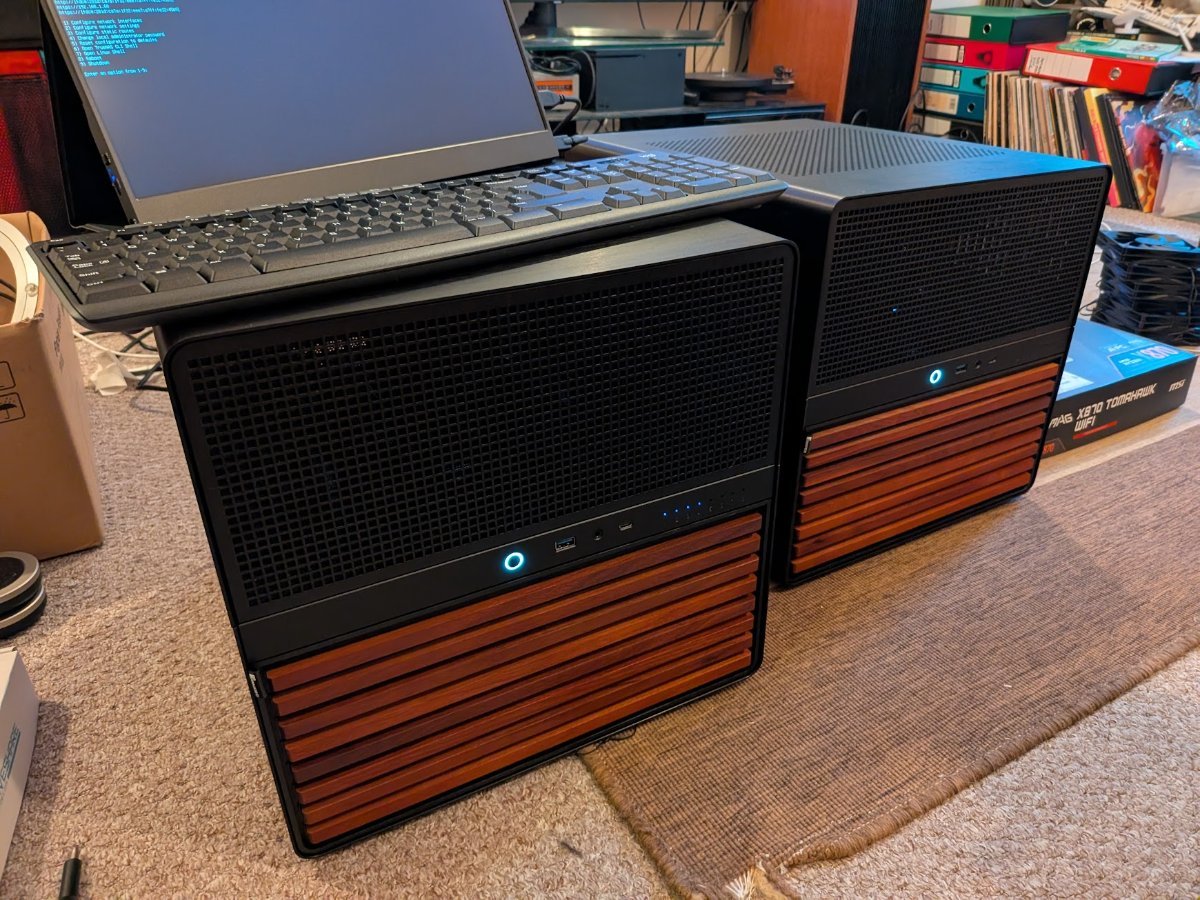
So, I built twin HexOS systems (almost) in Jonsbo N5's 1 Ryzen 9 9900X (12C/24T) and 1 Ryzen 7 9700X (8C/16T) 1 RTX 4070 TI and 1 RTX 3070 For both: MSI Mag X870E Tomahawk 96GB DDR5 Boot - Crucial P310 1TB in Raid 1. Storage - 4 x Seagate Ironwolf Pro 4TB RaidZ1 1000w Modular PSU PCIE X8 SAS card and onboard to connect all 12 bays in the N5 Intel X550T2 Dual 10GbE NIC Full case fan replacement with Nocuta fans and a NH D15 cooler. Mirrored backups between the system over Tailscale and one machine moved from my house to the workshop 30mins away for offsite actual a backup backup. Too much? ETA- I built them in August last year, before things got...too crazy

- 1 reply
-
- 1
-

-
Just checking, as I messed up my perms. Restoring from backup won't restore the perms?
-
Hey, Unfortunately Hexos does not offer the possibility to use any drive as a write cache, you can only use it as a read only cache drive, which only offers a benefit in particular use cases and streaming isn't one of them. You can use your current 500GB drive for the OS it's just a lot of wasted space. But if that's what you have and don't want to spent ridiculous amount of money for a new lower size SSD, go with the 500GB one. You don't necessarily need a new NIC, it's just possible that your current will not work, but not a certainty. Some of the newer Realtek NICs work fine. Give it a go and only buy a new NIC if yours isn't working or causing issues.
-
Thanks you sir... ok so if i went with a smaller drive for the OS i can use the nvme for cache, and i need a new nic and one more drive so i can expand in the future ... thank you for the comprehensive reply
-
 https://www.gingerling.co.uk/how-easy-is-hexos-to-resurrect-when-youve-ignored-it-for-3-months-because-you-had-a-new-boyfriend/ Enjoy 🙂 Ax
-
- 1
-
-
 I would like to set up a VM to run as an ark survival ascended server for some friends and I
 -
“I’m trying to set up a Windows 11 VM on HexOS using a VIRTIO disk and a Win11 ISO. The VM is running, but when I open VNC, I only see a shell instead of the Windows installer. The hypervisor reports that the ISO is ‘locked by root,’ and I’m unsure how to give the VM access to the ISO and disk. I need guidance on fixing permissions in HexOS so the VM can boot the Win11 installer properly using UEFI and VIRTIO drivers.”
-
I really appreciate all of your help. Thank you so much!!!
- 3 replies
-
- 1
-
-
- installation
- question
- (and 1 more)
-
What are the actions to do? It seems I might be similarly affected, although it may be bit different (today's immich update caused application to crash on startup - see ). I have also some extra question and minor bug reports for you here:
-
Hey, that is a nice setup and will allow you to run a lot of stuff on your server 🙂 Some things to consider: You can only us the boot drive for the OS, 32GB are more then enough, 500GB are overkill, but you can still use it with 2 drives, Hexos will create a mirrored pool, which means you will have the capacity of 1 drive (4TBs in your case) and you can lose 1 drive. Additionally a mirrored Pool cannot be extended. If you want to have the possibility to extend the pool in the future, you need to have at least 3 drives now to create a RaidZ1. A RaidZ1 can be extended with additional drives in the future and you will have the capacity of your smallest drive * (the number of drives - 1) Your Motherboard has a Realtek NIC, which have a tendency to not work well or at all with Hexos. It's a new 5Gbps NIC which might work better, but keep this in mind if you face network issues. Hexos is an awesome, easy to use OS and offers exactly what you need to get started. It offers both Plex and Jellyfin as 1 click install apps, so that you have the choice what you want to use. It also offers other popular apps as 1 click installs and more apps will be supported in the future.
-
So i decided to build a NAS to rip my movie collection and to tinker with some future projects when i have the time to learn about VM and AI I have a 9950x i got from a friend and 64gb of ram i bought 2 years ago for 340 dollars can you believe it i miss those times A used 5060ti 16gb found for cheap so i said to myself why not build a NAS it will be nice project during my free time. So i bought ASUS ROG Strix X870E-E Gaming motherboard , i have an old m.2 500gb for the os another 2tb nvme ssd for apps or whatever and i have two 4tb hdd laying around and i wanted something easy to use as the OS My question is what is the best approach for this build should i go for the hexOS and if yes how should i configure the ssd's to avoid any issues and i'm planning to add more hdd in the future once i figure out how to use a NAS Keep in mind I'm just a simple PC gamer never tired something like that, I'm a NAS and networking virgin. Thank you in advance any advice will help.
-
Seems like this might require some more hands on support. I sent you a dm
-
I'm not sure those instructions apply. It states: his guide only applies to curated immich installations that have not been customized users that can still access the immich web-ui I have previously set more than one folder for my files and I cannot access the UI since the application fails to start
-
https://docs.hexos.com/troubleshooting/common-issues/ImmichMigration.html
-
I'm not familiar with the process, could you point me to an article on this?
-
you may need to do an immich migration depending on how old of a version of immich you are using
-
I haven't touched my NAS in a while, so there have been multiple Hex updates since my last login - checked in this weekend and noticed that Immich was not running and there was an update available for it. The app fails to start and returns this error: "[EFAULT] Failed 'up' action for 'immich' app. Please check /var/log/app_lifecycle.log for more details" I tried running that command in shell, but I must be missing some initial commands to get me to a place to run that because it doesn't return anything on its own. Some googling brings me to some TrueNAS forum articles suggesting this issue refers toa 'postgres' issue but I only see two options for this in the TrueNAS side and changing it did not allow the app to start.
- Earlier
-
I don't think you can setup the curated app with VPN, unless you set up the VPN on your router. Instead you will need to install the app manually in TrueNAS and set it up with Gluetun. See this thread where people have discussed this: I do hope that the HexOS team will create a better solution for this, as the current setup can cause a whole lot of issues for HexOS users.