Leaderboard




Popular Content
Showing content with the highest reputation since 03/09/25 in Posts
-
Hi all, Big news! I’m spending this weekend reviewing the preview build for our Q2 update (final sanity and bug checks). Did a cursory preview today with the team and they really knocked it out of the park! Next week this update will be live along with the ability to natively update the OS to 24.10.2.2 and we will also be publishing a new ISO for this build as well. Expect a blog with even more info. Just wanted to share this exciting news with everyone! I have a busy weekend ahead of me….33 points
-
Hey guys. Apologies for the lack of comms on our side. We've been very heads down and focused on the Q2 update and planning for our first team offsite meeting in June. I'm working on a blog post for this week with more information and planning a regular schedule to provide updates more consistently. Regarding the pace of progress, something to keep in mind. We built Eshtek on a bootstrapped budget to avoid the temptation of taking big VC money and forced to race for an exit. That's how products become enshittified as we've seen with so many over the years. We were very deliberate and intentional in our partnerships and investors. We're in this for the long haul. But doing this still comes at a cost. Yes our Black Friday launch was wildly more successful than we could have hoped, but an influx of cash has a delayed effect to benefitting productivity within a business. Once you get it, you have to make sure it stays (refunds) and you have to be smart about how you spend it (services, tools, people, etc.). Then it takes time to make all of those things work well for you. If we would have taken a couple million back in 2022 when we incorporated, we'd already be at 1.0, but we'd also not have as much control over the business and our vision. I don't blame anyone for their comments. HexOS is very light right now. Apps are badly needed to improve. Fully agreed. We released it when we did to prove the concept and that we have the chops to build this thing. It gave us more than enough capital to get there and we immediately reinvested that extra capital to not only expand our team faster than planned, but to expand our roadmap in ways we haven't even publicly disclosed yet. I guess this is a long way of asking you all to have faith and I will do better at providing more frequent updates and not leaving you in the dark for so long. Thank you.26 points
-
Additional Apps We’ve just added Jellyfin, Home Assistant, and qBittorrent! And this is just the beginning, thanks to our new curation process, we expect many more apps to come online soon. Intro to App Curation We've added an interface to the HexOS frontend to make iterating on apps easier and to let the community contribute their own curations. By enabling Dev Mode in Preferences, you'll unlock the Custom Script option for app installs. From there, you can tweak existing install scripts or create new ones then share them with friends or submit them to the official HexOS curation templates. Right now, the feature focuses on streamlining the app install process. Soon we plan to surface installer questions directly in the UI and automate post-install steps (such as in-app setup wizards). That work depends on the in-development Local UI project, we will share more news about this in the future. We'd love your feedback as we refine this, let us know what's working well and where you're running into friction. Official Docs We've launched a documentation site! This new resource brings together everything you need to know about HexOS, including getting started guides, feature documentation, troubleshooting help, release notes, and community resources. Along with App Curation, we are opening the docsite up for community contributions. Learn about how to contribute here. - Docsite contributions - App Curation Folder Wizard Arrives We've extended our simple folder creation interface with a new wizard-driven process that unlocks specialized use cases like encrypted folders and Time Machine backups. With this foundation in place, we're now ready to move forward on bigger features including Snapshots, Replication, and Buddy Backup. First Flight Updates We've made improvements to First Flight, our onboarding experience, to help new users get up and running with HexOS more easily. Key improvements include: - Progress Tracking: When you complete tasks shown in the First Flight modal, it will pop up again to show you which tasks you've completed and what's still left to do - Persistent Banner: A banner now lives at the top of every page, keeping First Flight guidance accessible throughout HexOS This feature is designed to make the HexOS onboarding process a little more intuitive, especially for users new to home server management. --- NOTE: This update was applied automatically. You may need to clear your cache. Help with clearing you cache is available here.25 points
-
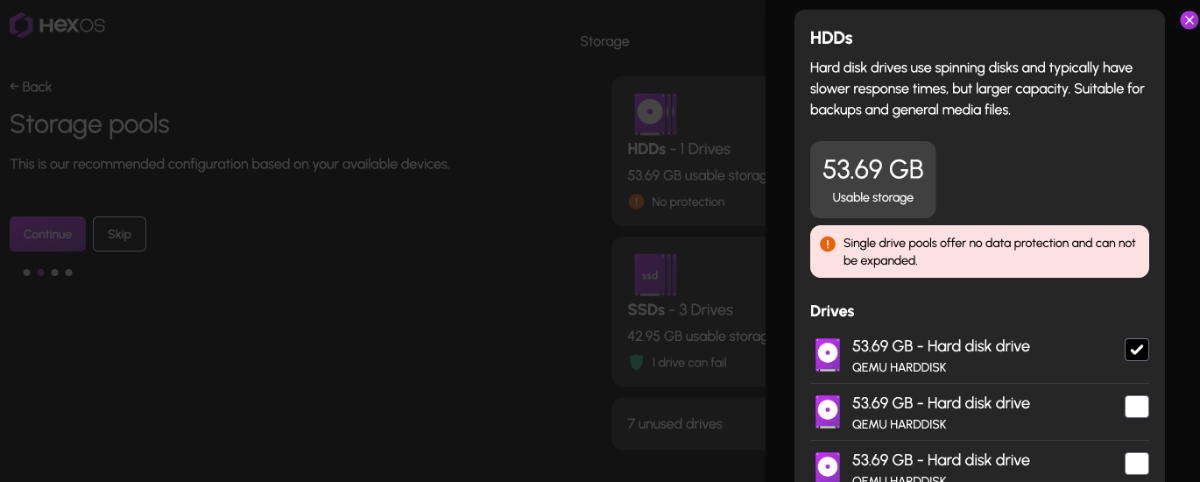
Manual Pool Configuration Customize your storage pools with granular control over drive participation. This even includes the ability to create 1-drive pools (without redundancy or expandability). This applies to both our setup wizard and the main storage page itself. Proper warnings are displayed based on the risk profile of the pool being configured. In addition, users that previously "disconnected" (this process is now referred to as "Unclaiming") their server from HexOS can easily reconnect through the setup wizard without being forced to recreate their storage pools from scratch (just click "skip" when on the storage configuration page of the wizard). New Activity Center The Health card has been replaced with Activity. Activity tracks everything you do in HexOS: our custom orchestration, server events, alerts, updates, and dismissals. Dismissed activities are reviewable from the activity archive. Update to TrueNAS SCALE 24.10.2.2 Another benefit of the new activity center is the ability to update the OS running on your local server itself. You will find the ability to update the OS also in the new Activity Center on the Dashboard. User Settings & Preferences Improvements Light or dark theme, preferred language, hidden dashboard cards, these all now sync and persist across browser sessions. The dashboard is yours to shape and customize as you see fit. UI and Stability Improvements Improved card layout and polish across the UI, the password field now supports toggling visibility, username character limit raised to 30, and plenty of behind the scenes stability fixes. Customizable Location Preferences You can now set exactly your performance versus capacity pools, app locations and other storage preferences that allow our one click installs to work. Works across all curated and custom apps. How to Update Updating the Command Deck itself is an action performed by the HexOS development team. User's are not required to perform any action to receive the update. It will appear automatically upon login after it goes live. For users still running the 24.10.0.0 build of TrueNAS SCALE, you will see an "Update Available" notification under the Activity Center once you login. Once you engage the update, do NOT power off your system. Wait for the update to download and restart your server automatically. Your system will automatically reconnect to the Command Deck when complete. The time this process can take will vary based on your Internet connection. Known Issues There is a TrueNAS SCALE bug that affects HexOS users when switching your network configuration from DHCP to Static; manually setting DNS before making this change will prevent the issue; we have a planned hotfix for this as well. Skipping storage pool creation in the wizard allows users to create pools within TrueNAS and they will show up in HexOS; WARNING: we have not tested all pool layouts (or sub-pools either), experiment with great caution.25 points
-
Let's Talk About Immich If you've been running Immich on HexOS this year, you know it hasn't been smooth sailing exactly. We want to talk about what's happened, why it was so challenging, and how we're working to handle these situations better in the future. What Happened? Earlier this year, Immich deprecated their old storage configuration and required all users to migrate to a new structure. For users running Immich through docker-compose or other manual setups, this meant updating some configuration files and running a few commands. Annoying, but manageable. For some HexOS users, the migration was more involved. Because of how TrueNAS SCALE structures application storage, moving to the new configuration required either reinstalling Immich fresh (the simplest solution) or manually migrating existing data between datasets (a process that involved SSH access, rsync commands, and careful attention to permissions). But if you're choosing between "reinstall the app" or "follow a 15-step guide," neither option feels great when you chose HexOS specifically to avoid that kind of complexity. Why Was This So Hard? When Immich made this change, we had a choice to make. We could have built a comprehensive rsync-based migration tool using the TrueNAS API. It has those capabilities. But that would have meant dropping everything else we were working on to build what amounts to using a cannon to kill a mosquito: a massive, complex solution for what we hope won't be a regularly recurring problem with this particular app. Instead, our community stepped up in a huge way. Users like @forsaken and @G-M0N3Y-2503 created detailed guides (to move or rsync your data). These guides walked through the manual migration process to preserve existing data in Immich. They focused on helping users through the immediate problem, while we continue building the platform we need to handle situations like this properly. That platform is HexOS Local: a locally-hosted management application that will let us perform complex operations without being bottlenecked by the engineering overhead of building one-off solutions through the SCALE API every time an application throws us a curveball. This reduces the technical burden on our team and, more importantly, gives us the flexibility to automate maintenance tasks that previously would have required manual intervention or massive engineering investments. This same platform will serve the Local UI/UX feature we've committed to delivering as part of our 1.0 release. We'll be talking a lot more about HexOS Local in an upcoming blog post, but the key takeaway is this: we're building HexOS to handle whatever the open-source ecosystem throws at it, without having to choose between "drop everything and build a custom tool" or "make users SSH into their servers." What About Right Now? If you're currently running Immich on the old storage configuration and haven't migrated yet, you have options: The simple path: Reinstall Immich fresh with the new configuration. Your photos will need to be re-uploaded, but the setup is clean and straightforward. The preservation path: Follow one of the community migration guides to keep your existing data in place. These guides are more technical and require command-line access, but they work. Our recommendation depends on your situation. If you have a manageable photo library and good backups, the fresh install is probably your best bet. If you have years of photos, carefully organized albums, and user configurations you don't want to recreate, the migration guides are there for you. And if this seems to daunting, email support@hexos.com so we can schedule a time to assist you directly. Moving Forward The Immich situation showed us exactly where we need to invest engineering effort. We can't keep facing the choice between building massive one-off solutions or asking users to break out the terminal. That's not sustainable, and it's not the HexOS we're building. Immich is an incredible project. It's exactly the kind of self-hosted solution we want to make accessible to everyone. The team behind it recently released v2.0, marking their stable release with better upgrade paths going forward. We're committed to making sure that when the next complex maintenance task comes up, whether it's Immich or any other application, we have the infrastructure in place to handle it gracefully. That's the HexOS we're building. Thanks for your patience while we get there.21 points
-
Update: As of 6/23, we have updated the ISO available in our READ ME FIRST post to the 24.10.2.2 version. New users installing with this version should NOT be affected by the issue documented below. Hi all, As of June 1st, attempts to install or update apps via either the HexOS or TrueNAS interface (running on 24.10.0.0) will fail. Users affected by this issue are welcome to install the 24.10.2.2 update via the TrueNAS interface to immediately resolve this issue. Our sincerest apologies to anyone currently affected by this. In the next two weeks, we will be publishing our Q2 update which will include the ability to update your underlying HexOS version to run on TrueNAS SCALE 24.10.2.2. Sincerest Regards, Jon19 points
-
Hey all. Q3 update coming Monday. Bunch of other goodies and content with it.19 points
-
New blog post up today providing a status update on HexOS! https://hexos.com/blog/hexos-q1-status-update19 points
-
Hello all! We are excited to announce HexOS Local, powering the new local UI/UX for HexOS and capable of so much more. Read more about it on the Blogpost - Introducing HexOS Local16 points
-
Pushing out a small patch today. This release addresses issues with app installations and includes updates to the forums. Bug Fixes App Installation Fixed issue with long running app installs - App installations that took longer than 2 minutes were incorrectly marked as failed, even when they completed successfully. The timeout handling has been improved to properly handle longer running app installs. Forums Along with these small bug fixes, you may notice a few changes around the hub. We’ve added new sections for each curated app supported by HexOS. This update will help us stay organized and respond more efficiently to issues related to app curation. It also makes it easier for us to share announcements, provide updates on ongoing bugs, and post solutions as they become available. Immich Following our recent Q3 update, you may have noticed some issues with Immich. We’re aware of what users are experiencing and are preparing a guide to help address these problems, which should be available soon.16 points
-
Can the notification be changed slightly to make it clear it's a Command Deck update and not something locally we need to install? The notification said "HexOS has received an update" so people may be looking around to see where to update. You can see it's a Command Deck update if you click "Release notes are available here." but if you aren't the type to read release notes you may still get annoyed looking around for how to update your HexOS install. Not having a moan, just wanting to keep it as clear as possible for everyone - Thanks! EDIT: Actually now I'm not sure if it's actually an update we are meant to do or not 😂14 points
-
We recently merged a few updates to our command deck to improve observability around request timing. This new instrumentation gives us better insight into performance and will help us identify and resolve issues more precisely. No changes were made to the Command Deck UX in this release. You might already notice things feel a bit snappier 😉 ... let us know.13 points
-
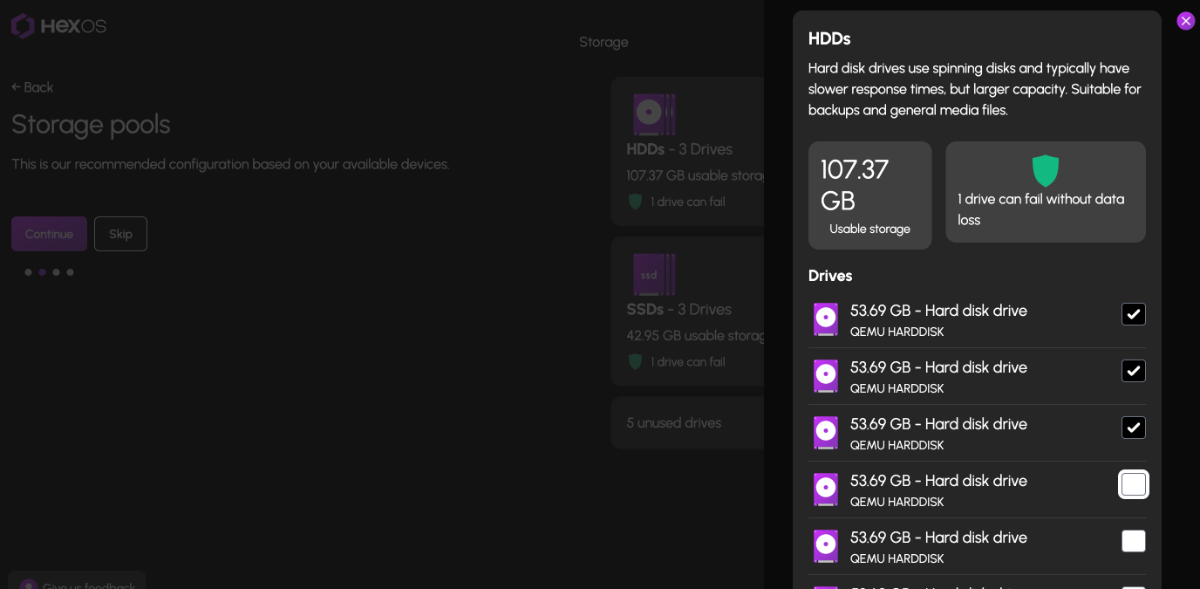
Weekend testing went great! Documented a handful of bugs/issues that the team is actively squashing this week. Still hoping to publish the release by Friday, but we reserve the right to postpone till Monday if necessary. Here's a sneak peak at pool customization (drive selection) in the wizard: You'll notice in the background next to the "Continue" button that we have the option to "Skip" now! This will let users get into the dashboard without configuring any storage pools. This will enable the ability to adopt existing pools from TrueNAS SCALE itself (and other platforms).
 13 points
 -
Blog post: https://hexos.com/blog/introducing-zfs-anyraid-sponsored-by-eshtek For those that missed it yesterday, AnyRaid was announced on the ZFS Leadership call. This Eshtek-sponsored feature will bring mixed size drive support to OpenZFS. We will be posting a blog about this in more detail soon! Edit: Here's a link to the YouTube video from the ZFS Leadership call. https://www.youtube.com/watch?v=MifloJFCpLU12 points
-
Another Command Deck update went live today. This release includes: Fixes to the networking layer for users switching between DHCP and static IP modes Improved performance across the app based on the observability metrics added last release A new queuing and caching layer to handle folder loading for users with a large number of folders, preventing API overload with TrueNAS A fix for a bug that caused folders to appear missing when a private folder user had been deleted Performance work is ongoing. Let us know if you spot anything.11 points
-
Right side but the toggles should closer to the words like they are on the Left version. half the width of a monitor is too far away11 points
-
We've discovered a handful of different issues with immich plaguing users. We are on the case and it's a priority issue for us!10 points
-
New blog post talking Q2 update details and the ZFS leadership call tonight. https://hexos.com/blog/status-update-amp-zfs-leadership-call-tonight9 points
-
UPDATE: As of 11/8, we have updated the ISO installer to run on version 25.04.2.6 of TrueNAS SCALE. Existing users should NOT reinstall to get this version. You can update from within the Activity card on the Dashboard (or the Notification). Hello and thank you for joining the HexOS beta program! You are an elite and vital part of this project and your participation is greatly appreciated. This post contains all the information you will need to get started with HexOS and how to communicate with our team during your beta experience. Disclaimer Beta Products, Software, and any related Services are still in development, and therefore, you are advised to safeguard important data, to use caution, and not to rely in any way on the correct functioning or performance of the products, software, or any related services. Beta Products and Services are provided to you “AS IS”, without any warranty whatsoever. Expectations During your participation in the beta, we expect you to do the obvious: use and test the software. But we also expect you to communicate with us when things don’t go right or if you’re having trouble. Please post feedback and let us know about your experiences, good and bad. That being said, please remember that this is beta software and early access. HexOS has a long and healthy roadmap ahead. Quickstart Guide For those that just want to get started, here’s the TLDR: Download the ISO here: https://downloads.hexos.com/TrueNAS-SCALE-25.04.2.6-HexOS.iso or https://hexos-downloads.sfo3.cdn.digitaloceanspaces.com/TrueNAS-SCALE-25.04.2.6-HexOS.iso (SHA256 Checksum: e8ed99a322affe0969b82b866161a9f6acbc1561e3cc7b2efb2bf120ffe2e856) Use a tool such as Balena Etcher to image a USB flash device with the ISO. Boot your server from the flash device and install the OS to preferably an SSD. When given the option, opt to create the admin password in the installer (do not select the option to "Configure using WebUI"). Remove the flash device and reboot your server when the install is complete. From another device (mobile, tablet, desktop) that is on the same LAN as your server, login to https://deck.hexos.com using your HexOS credentials. Follow the instructions to complete your server configuration. NOTE: As of the 24.10.2.2 build of this ISO, configuring the admin password via the webUI option has been removed from the installer. However, if you select to create an admin password, but then attempt to "cancel" that process, the ISO will proceed with an installation with no admin password set. This is a known bug and the TrueNAS team will be addressing this in a future update to the ISO. Just don't cancel out of creating the admin password in the installer ;-). Hardware Requirements Booting HexOS is designed to support a wide variety of x86 hardware (Intel or AMD). The minimum requirements are a 2-core 64-bit CPU, 8GB of memory, and a 16GB or larger SSD boot device. However, depending on your needs for performance and applications, more resources may be required. Storage Pools Pools are made up of storage devices based on size and type (HDDs vs. SSDs). Storage devices in each pool need to be roughly the same size*. The OS boot device cannot be a part of a pool. Expandable pools require a minimum of 3 devices and can be grown one device at a time. Non-expandable pools can be created with 2 devices. Initial pool width should not exceed 8 devices. Maximum expanded pool width should not exceed 12 devices. At least one storage pool must be created to use HexOS. *In the event of slight variations (e.g. 240GB and 256GB), devices can be grouped, but total capacity for the pool will sacrifice the larger device’s excess storage. Build Recommendations HexOS has been designed so that a relatively modern PC can be easily transformed into a very viable home server. This means using standard HDDs/SSDs and using onboard controllers for storage/networking. However, since we’re based on TrueNAS, our hardware support is actually rather vast. For more detailed hardware recommendations for advanced builds, please refer to the TrueNAS SCALE Hardware Guide. Installing in a VM As HexOS is based on TrueNAS SCALE, it can be installed as a virtual machine as well. While the process should be fairly self-explanatory, please see the TrueNAS SCALE documentation for additional instructions on VM installation. Setup and Configuration Once the OS has been installed and rebooted, you will use a web browser on the same network as your server to register your system and complete the setup process. This can be a PC, tablet, or mobile device. Using a capable browser, login to https://deck.hexos.com. Beta 1 Features Our first release is focused on providing a streamlined user experience for setup and configuration and laying the framework for what’s to come. The main features of Beta 1 include: Setup and configuration wizard Configure your home server in minutes with ease. Analyze system health, with warnings for SMR HDDs. Auto-configure storage pools to safeguard against device failures. Securely manage your server remotely via Command Deck. Storage device management Detect error states and conditions and report through the dashboard Highlight individual storage devices and their respective faults Replace devices from storage pools due to failure or preventative maintenance Expand pools as little as one device at a time Folders and users Create and share folders over your local network. Easily manage permissions for secure access. Apps One-click deploy Immich as a personal photo library app. One-click deploy Plex as a home media server. Automatic folder creation for app storage. Dashboard / UI Access key statistics like CPU, memory, network, and storage usage at a glance. Monitor storage health and see alerts for errors or degraded pools. Manage multiple servers from a single, unified interface. Enjoy mobile-responsive design for effortless navigation on any device.9 points
-
I would like to see first party support for placing any app behind some of the most popular VPNs (PIA, Nord, Express, Proton, Tailscale, etc), as well as custom VPNs (WireGuard, OpenVPN, etc). For example, you may install “The Lounge” IRC client and have all internet communication pass through a PIA VPN so that your home IP is not exposed while chatting. Traditional methods of doing this involve painful configuration of iptables or other firewall rules. I believe this is an area where HexOS could really simplify things: Install a VPN plugin, authenticate with it, and then simply assign an app to a VPN plugin via the app’s settings if desired. It would be fully accessible from the home network without going through the VPN, but all internet traffic would go through the VPN with a kill switch in case the VPN goes down. Thoughts?8 points
-
Hey all! We've published a new blog post sharing some of the development work happening behind the scenes at HexOS. This time, we're highlighting our new end-to-end testing suite which is going to drastically help our development moving forward. Checkout the new blog post for more details! The docsite has also been updated to include two awesome user created guides regarding Immich. To be fully transparent, we are still figuring out what exactly the HexOS official solution looks like, but want to provide you with as much support as possible in the meantime. docs link: guide by @Forsaken (hub link) docs link: guide by @G-M0N3Y-2503 (hub link) Here is also a guide directly from the Immich community. If you have more specific questions/issues with Immich please put them in the Immich support section. You may have also seen that we are hiring! This role (along with our end-to-end testing) will be crucial for keeping up with apps and staying ahead of issues like the one we saw with Immich. Thank you to everyone who applied! We’ll be conducting interviews soon and are looking forward to chatting with you all.8 points
-
I'm deeply disappointed to hear this. We did have a banner on the forums for a while pointing to the Q2 update, but the post itself is still where all of our update posts have been going: the Announcements forum. In addition, there have been multiple Command Deck updates since then that have seriously improved deck.hexos.com performance and responsiveness, as well as resolved a significant networking bug. Check out the Announcements forum and specifically posts by @jerod (our CTO). FYI, I'm Jon (the CEO and Co-Founder). Clearly we're missing some simple comm relays (like the Q2 update dropping) and some of our terminology could be more clear (differing from major and minor updates, OS vs. Command Deck as well). I do apologize for that, as comms are ultimately my responsibility right now. I've told our dev team to stay out of the forums beyond reading posts and communicating with @mill3000 on relevant support tickets. No blame on them for their lack of activity here. And while I greatly appreciate your input and desire for a dev-blog, we honestly just don't have the appetite to do it right now. Writing blogs wasn't part of the job description for the dev team either. We're putting all of our effort and the capital that was entrusted to us by customers (like you) towards building the product. I'm not sure what you mean by this comment. Is there an app you're trying to bring to HexOS that you've developed? I get it. You feel strongly about the devlogs. 😮💨 I don't. We're not even making big investments in marketing right now (our website is still the same from after launch week). All the capital is going towards making this thing really great (including backing/funding the ZFS AnyRaid project). Maybe that changes in the future when it makes more sense to me. Right now, each on-the-clock keystroke from our dev team goes to writing code or communicating ideas internally to further the project. I provide updates as I can and when there's something important to say (such as a release dropping). Clearly you're missing some of those and I'm struggling to understand how and why. It's important that I get this sorted because if it's happening to you, I'm sure it's happening to others as well. Especially as we're now moving at a faster pace than we were in the first half of 2025 and anticipate more frequent updates moving forward. I feel this too. 🤦♂️ I see the purchases you made and when you made them. @mill3000 referred to you as an OG and he's not wrong. No worries, I ignored all the BS from your post....mostly ;-). I definitely recommend checking your server for the Q2 update (the Command Deck will immediately be different if you haven't noticed already) and if you haven't, apply the available OS update from the Activity card on the dashboard. We have a lot more in store for Q3. I'm working on a few blog posts now. one to catch everyone up from June, and another to talk about our upcoming plan for apps. Thanks for taking the time to let us know how you're feeling. I'm confident if you purchased based on the vision you saw from us last year, you'll be happy you did by the end of this year. If you ultimately feel sour about this and want a refund now, let me know and we'll take care of it for you.8 points
-
We are working on increased app support this quarter. The plan is to build an app templating system that will allow us to more rapidly publish our curations and allow for the community to participate as well. I will be publishing another blog post soon to talk about this and our other priorities for Q3.8 points
-
I believe integrating Home Assistant with HexOS could be a game-changer for the operating system, offering functionality that is sorely lacking in almost all other OS platforms today. A Home Assistant integration would allow users to monitor and manage their NAS more effectively. Imagine being able to track critical metrics such as system uptime, array health, disk health checks, and the overall status of your storage systems — all from within Home Assistant. Furthermore, adding control features would significantly enhance the user experience. It would be fantastic if users could automate tasks like rebooting or stopping/starting applications, VMs, or containers directly through Home Assistant. Additionally, automating disk spin-downs during off-peak hours for power savings would be a powerful and eco-friendly feature. The potential of Home Assistant integration is vast, and it's difficult to fully capture all the possibilities in a single topic. However, the core idea is simple: having such an integration, with continuous updates and new features, would be a major advantage for HexOS. While most other operating systems either lack similar functionality or offer only basic, limited capabilities, HexOS could stand out by providing a more comprehensive, user-friendly, and flexible solution.8 points
-
Thanks! We are going through our final fixes today with plans to publish tomorrow. There will be a few “known issues” that we intend to address which we will document in the release notes. The biggest being our need to address the changes to Immich, but after this release, our cadence for publishing updates will be far more frequent. This release marks the culmination of 6 months of team expansion and growth. With these guys well tuned now, we will be moving at a quicker pace.8 points
-
Yessir!
8 points
-
It's hard to believe it's already been a year since we launched the HexOS Beta and the early access campaign. What a journey it's been! In today's blog post, we're going to provide a summary of this past year's accomplishments, a run-down of what's left to achieve our 1.0 release, what's coming next, an update on the AnyRaid project, and our HexOS Holiday Sale! Read all about it in our latest blog post: https://docs.hexos.com/blog/2025-11-26.html7 points
-
Hello, not sure if it was requested already, but a curation for the "Actual Budget" app would be greatly appreciated. I found it by looking at the apps tab, and did some more research on it and i would love to switch to it instead of my current app of Quicken since I pay yearly to use it. I think it would help many nowadays due to inflation. Thanks!7 points
-
Forgive me, but I'm really confused by what you're saying, which means there is clearly a disconnect in our marketing language and understanding with customers as well and I want to get to the bottom of that. Let's try some clarification here: Buddy backup is a feature that will allow two HexOS users (customers) to backup to each other's server in an encrypted fashion. There is no reason you cannot be your own buddy with a second license (e.g. you buy a second server license and put a server at a secondary location). If someone bought two licenses during black friday under two separate accounts, each account can backup to each other just the same (and if they want to merge those two accounts, we can handle that for the user). With this sale, however, we are not allowing someone to buy a second license to transfer to another user (as it would open the door to reselling licenses which we don't support). I get that the term "buddy backup" may not clearly identify that you can be your own buddy, but we thought it would be fairly obvious that if you could backup to someone else on a separate account, you could also backup to yourself on the same account. I think we could loosen the "encryption" requirement in the case of backups between two servers owned by the same account, but that's more of a technical detail than marketing. Let me know what's still unclear or how we can do better on the language here. Sometimes we can be a little too close to the trees to see the forest, so if you can help give us a better perspective, we'll work to improve our messaging in the marketing. Thanks!7 points
-
Buddy backup will definitely work with two licenses under the same account. You will be your own buddy 😉7 points
-
Another mid-quarter update featuring: - Install Script v2 with interactive questions during app installation to support user preferences (eg. Plex claim code) - Fangtooth Support with full TrueNAS 25.04 compatibility and automatic pool upgrades - Enhanced User Management with better visibility and access to folder permissions Read the full release notes: https://docs.hexos.com/release-notes/command-deck/2025-11-06 NOTE: This update was applied automatically. You may need to clear your cache.7 points
-
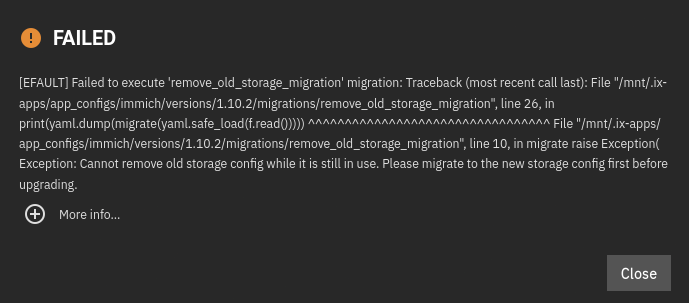
@jonp here you can see what it looks like when a user tries to update the Immich app through HexOS when they haven't manually migrated to new folders. I am having the exact same issue since the Immich app in TrueNAS stopped supporting the old folder structure. See the attached screenshot for the error you get in TrueNAS when attempting to upgrade the app. When upgrading through TrueNAS it fails instantly, but HexOS is "in progress" for a very long time before giving up.
7 points
-
No need to reinstall from the iso. When the update is out you’ll just see it when you login to deck. The OS update can then be applied from within the deck and all it will require when done is a restart of the server.7 points
-
In case there is any confusion still on this topic, a local UI is coming...100%. We actually have already begun work (we have a docker container with the UI running at this point, but it's not fully functional yet).7 points
-
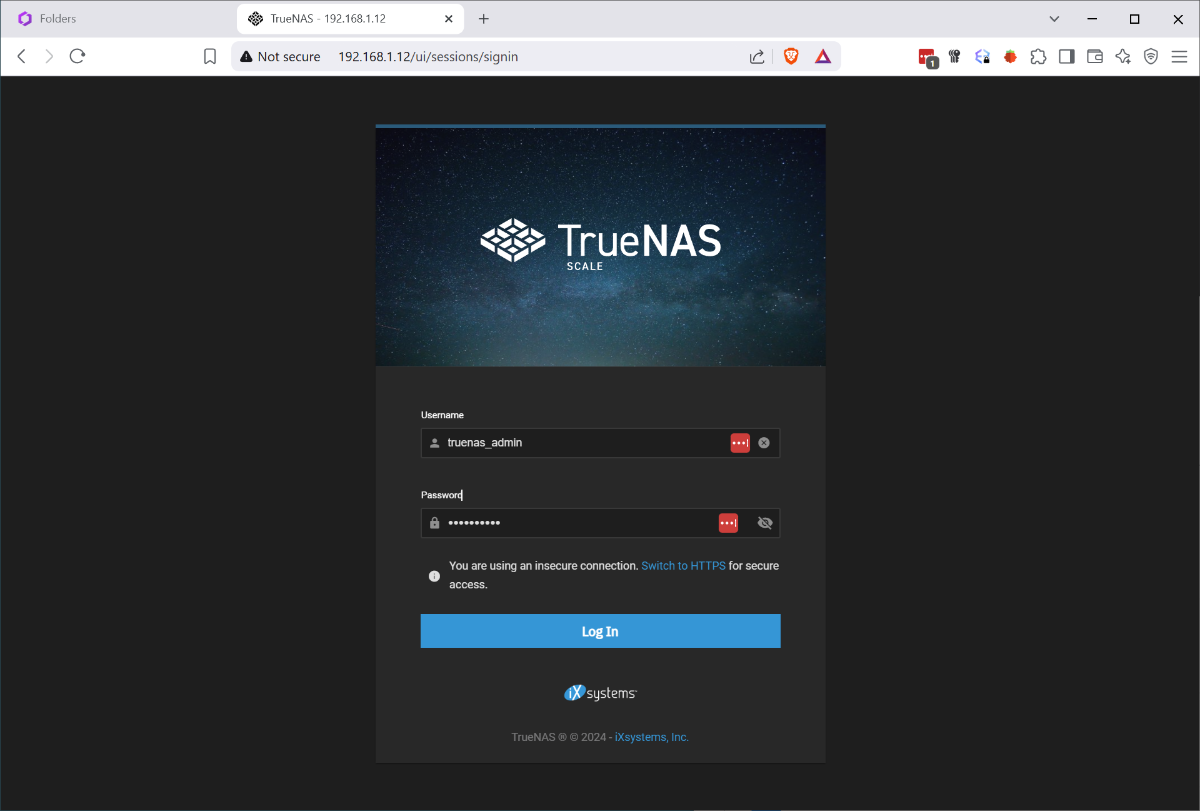
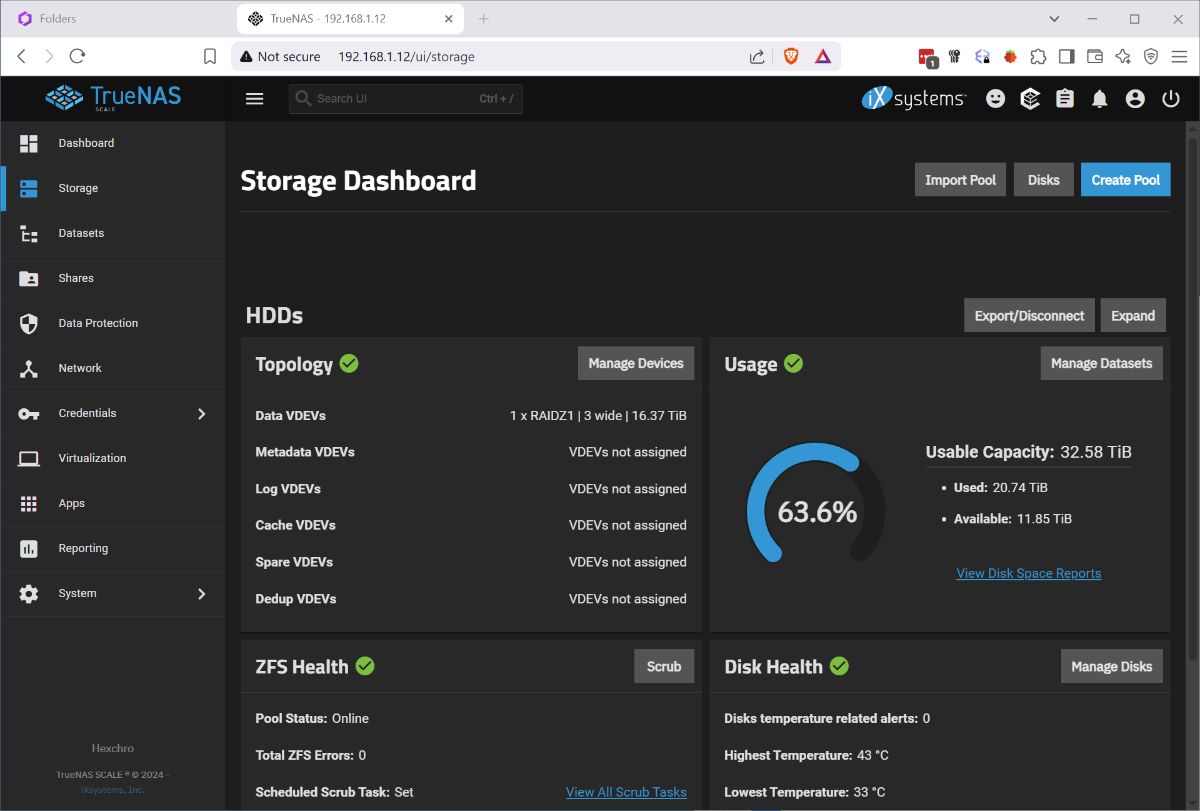
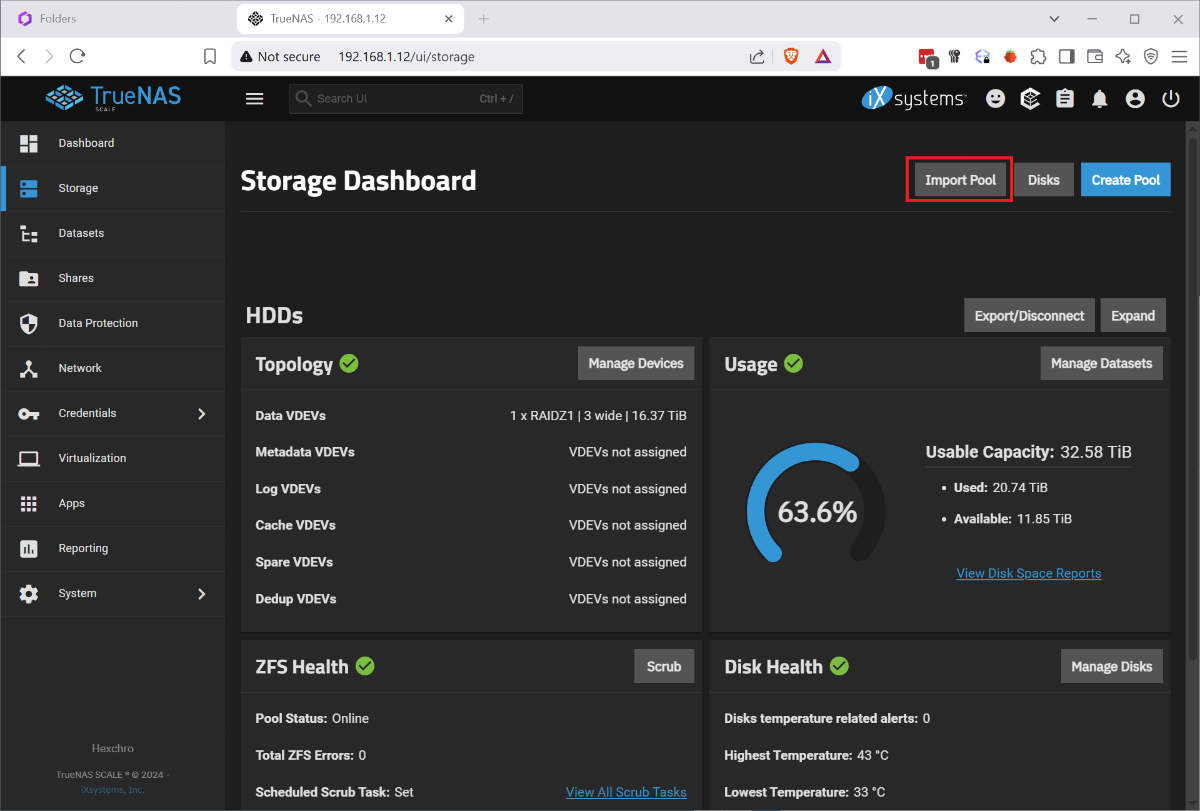
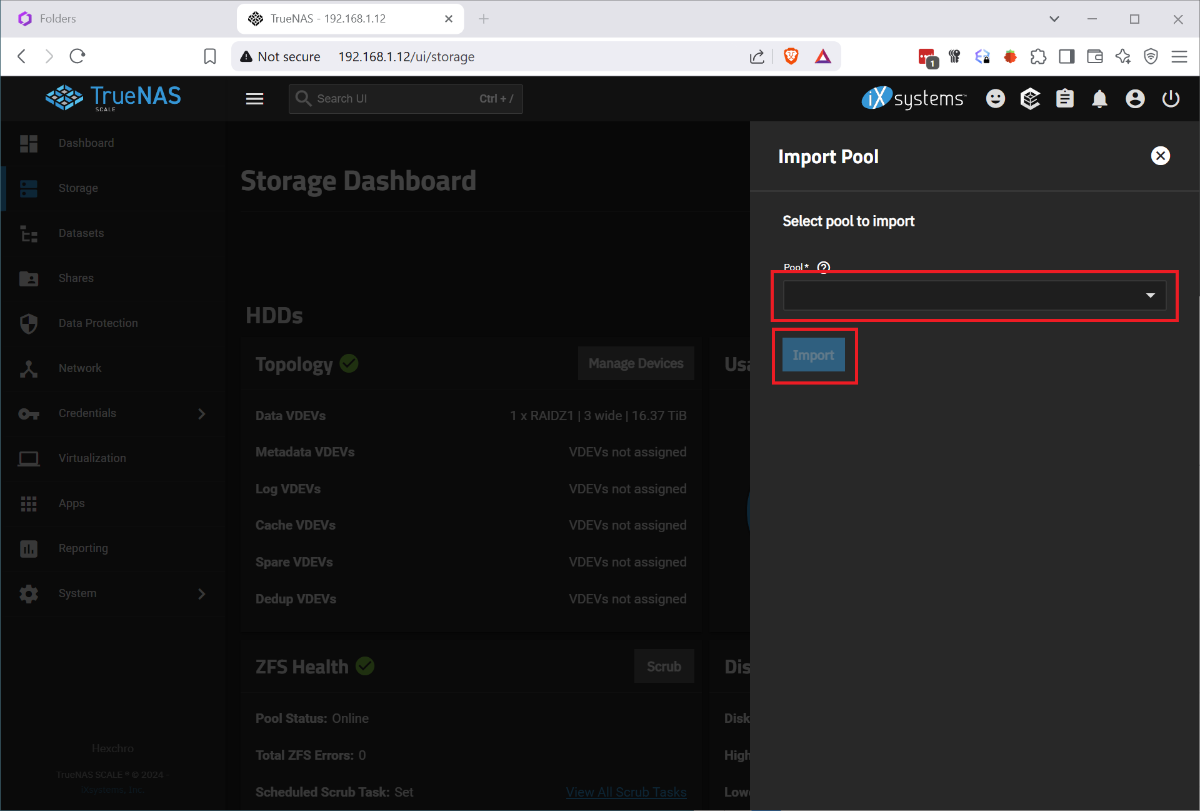
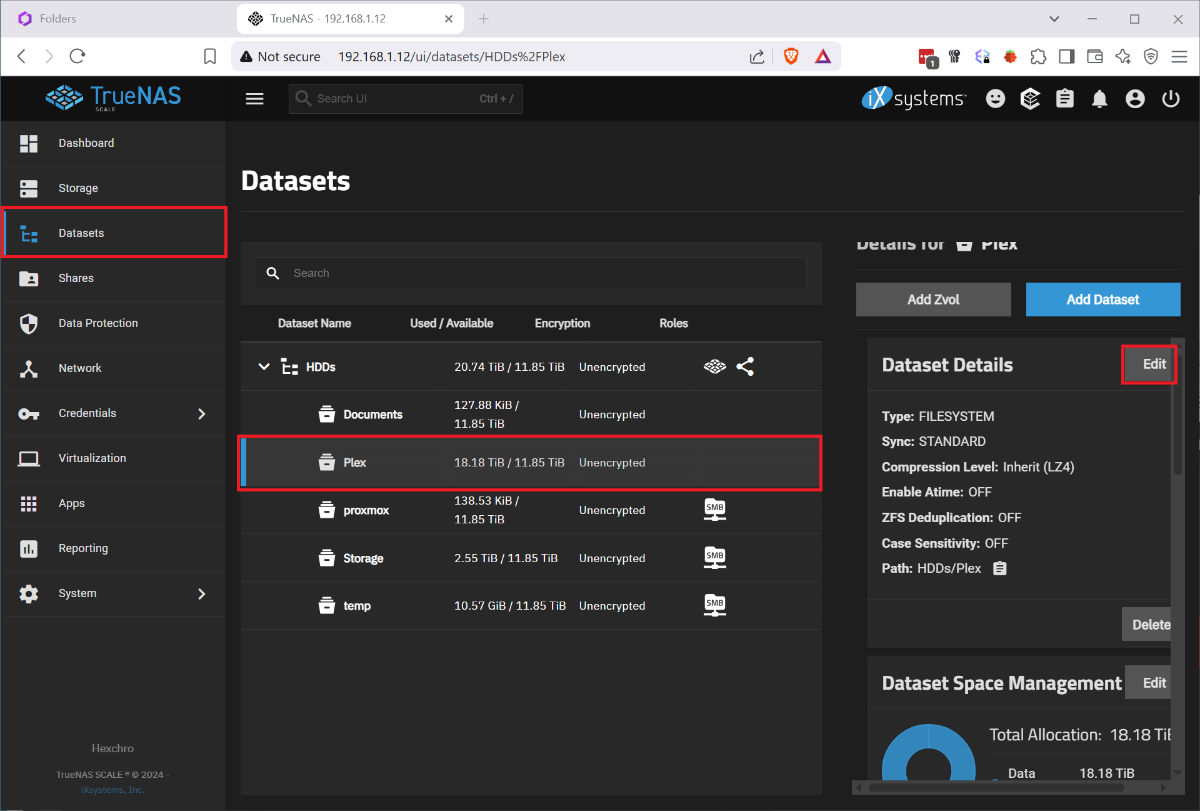
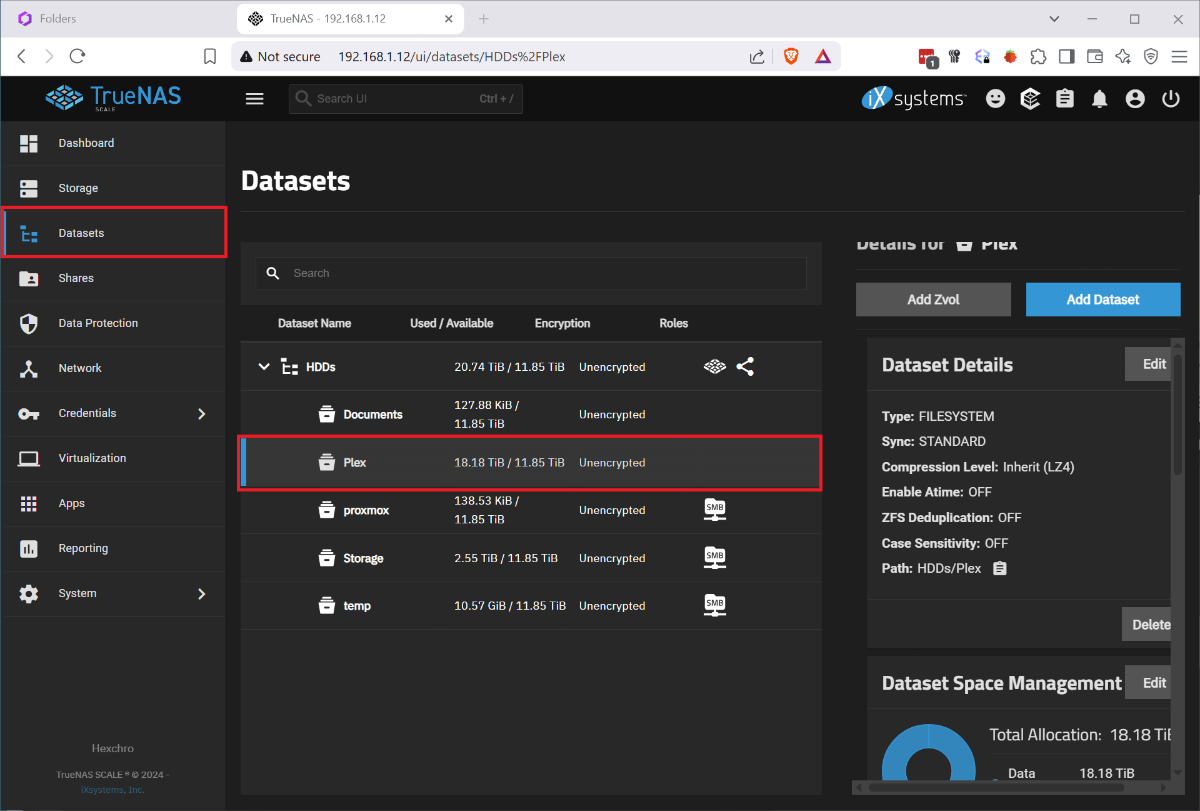
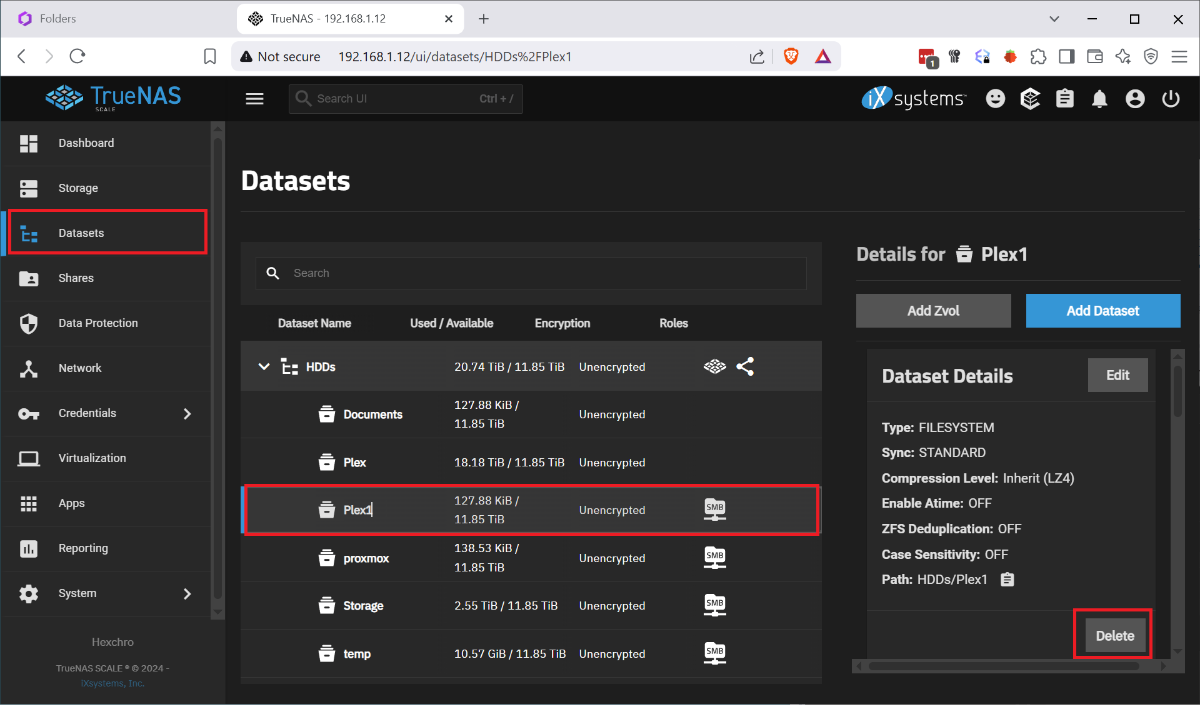
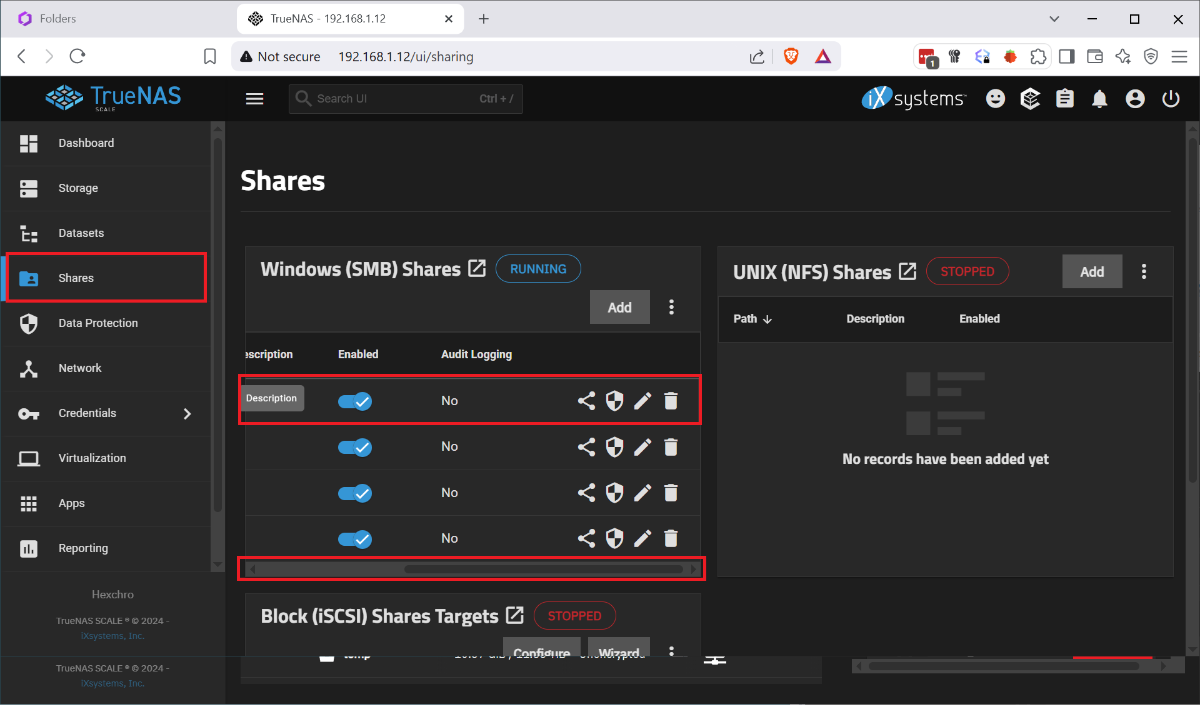
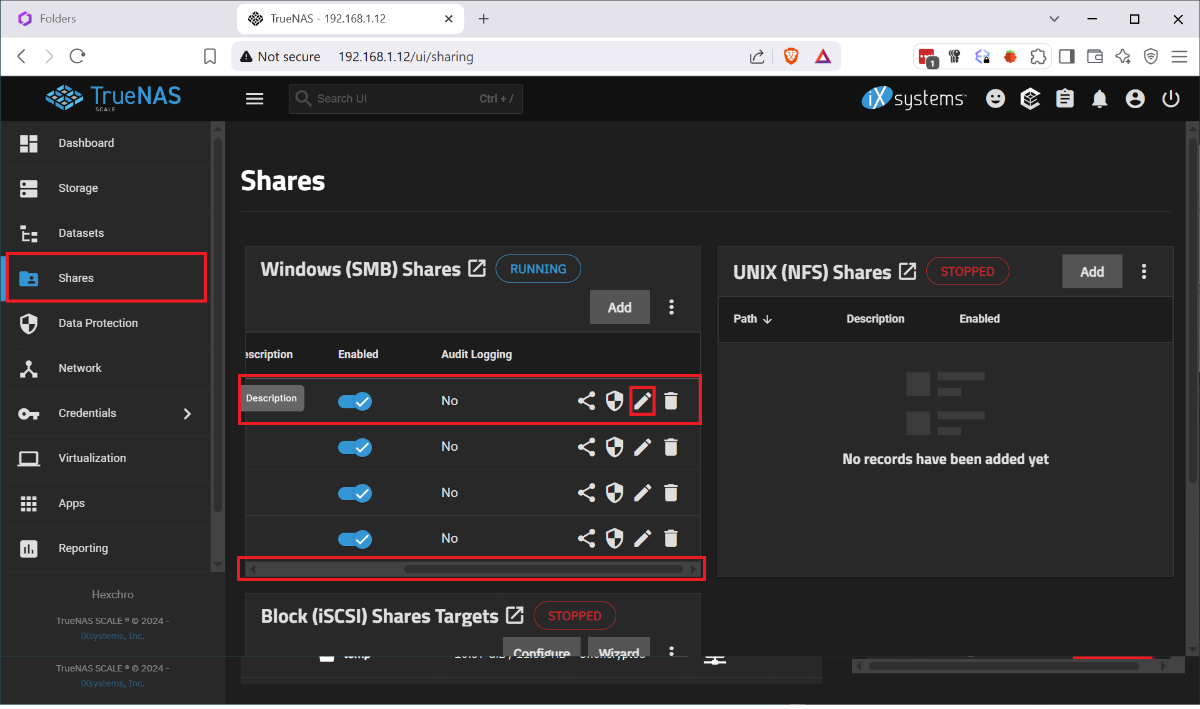
I ran into the issue that my boot drive was corrupted and I had to restore my HexOS install from scratch. I found posts that said basically just reinstall it but nothing that explained the process. I had several issues, when I reinstalled HexOS it wanted to wipe my raid, once i disconnected the raid and went through the initial setup, I had no shares. So I wanted to document this so that others with this issue find a solution instead trying to rename and recreate shares and move data between datasets. This was done after I figured out a process for doing this so sorry if I missed any steps. Step 1. Remove the bad boot drive. Step 2: Disconnect the Raid drives. Step 3: Install your new boot drive and usb HexOS install media. Step 4: Follow the standard install process, including setting your admin account and claiming your server. When you finish the setup you will not have any disks so you will name your server and just continue. Step 5: Shutdown the system. Step 6: Reconnect your raid drives and boot up. Step 7: Log in to the TrueNAS gui by going to the IP address of your server in the browser and using the credentials you set up during install Username: truenas_admin Password: <whatever you entered at install>. Step 8: Go to Storage Tab and select Import Pool. 9: Select your pool from the drop down it should be named 'HDDs' and select Import. It will take a few minutes to import and complete. At this point the storage should be detected in HexOS and you should be able to start creating shares, but your existing folders and shares will not have returned. To get your shares back you must recreate them by renaming your datasets and naming them back as follows: Step 1: Under Datasets you can find all of your existing data on the RAID. Find the Dataset you want to restore in HEXOS and note the name. Step 2: Back in HexOS go to the Folder tab and select 'New Folder' Note: you may want to recreate your old users manually or create your folders with public access and recreate the users and add permissions later. Step 3: Create a new folder with the same name as the Dataset but add a 1 (In this case 'Plex1'). Make sure to keep the array the same 'HDDs; and give it the permissions you want (this can be adjusted later). Step 4: Back in TrueNAS go to Shares and select the edit button on the 'Plex1' share, depending on screen resolution you may need to scroll the horizontal scroll bar to the right. Step 5: In the side bar remove the '1' from the Path or use the drop down to select the original shared folder, then click into the Name field which should auto update and remove the 1. Step 6 Scroll down and click 'Save' and you will be prompted to restart the SMB service, do this and your share should be updated. Step 7: Navigate to the dataset tab select the 'Plex1' dataset and click delete on the right side. It will make you confirm by typing the whole dataset path. Step 8: When this is done you should be able to refresh the folders tab on the HexOS page and see the updated folder name (it took a minute to refresh for me). Redo this for each share that you wish to recreate. Once I did this and set up the users and permissions correctly, other servers I used to connect to my shares started working seamlessly. I didn't experience this but I can imagine you may run into some permissions issues since the new users in HexOS could have different IDs than before. Unfortunately you would need to manually adjust permissions on the files and folders. P.S. I imagine minutes after posting this someone will tell me I am dumb and should have done it this way, or someone else posted better over here. If that's the case let me know and Ill point to a better example, but when I needed help I couldn't find it.
6 points
-
HexOS Gets a Major Upgrade This release introduces an improved Apps experience, new apps, two-factor authentication support, improved GPU support, and Goldeye compatibility. Read more about it on our docsite here at Command Deck Update - December 26, 2025 Also check out our latest blog for even more details! NOTE: This update was applied automatically. You may need to clear your cache.6 points
-
First, let me start by saying I actually really appreciate this question and I hope my answer gives you faith in our long-term sustainability, exactly as you mention in the title of this thread. The lifetime license model is appropriate for a very particular type of customer with very specific priorities: Bring your own hardware Doesn't want an ongoing subscription Will mostly support themselves It was the appropriate model to launch with as well because it allowed us to inject a larger cash infusion at the start. However, we see multiple additional revenue streams available to us in the future: Subscription-based licensing. A lower price of entry for customers that aren't ready to make the lifetime commitment. Support. A more premium support model that can help you on a 1:1 basis when you have issues with your server. Cloud-based Services. Things like cloud backups (as an alternative or in addition to buddy backup). There are other cloud-assisted services such as reverse-proxy/relay that may warrant a subscription as well. Hardware products We will never force anyone to buy a specific hardware product to use HexOS, but we may offer some for those that don't want to build their own in the future. We actually have a few other ideas for additional offerings as well that would add additional revenue streams to Eshtek, but those are a little premature to discuss at this point. Bottom line: we don't just have a product plan, we have a full business plan for the future of this company and it has been designed to ensure a few key things: We don't run out of cash. We don't have to take on outside investors. We can remain true to our mission and vision. I hope this answers your question and gives you more confidence in our plans for the future. And if you have any other questions, don't hesitate to ask!6 points
-
It is a must these days to have TailScale support, especially for secure remote access. It is far too easy to mess up a WireGaurd/OpenVPN Config, if the goal is security and simplicity, Tailscale VPN access should be a high priority.6 points
-
Def not cloud only. If your isp/network supports peer to peer, we can coordinate that and then get out of the way. That is what's included in a lifetime license. If we end up having to relay traffic for some users, that will require a subscription as we will have to pay for the relay traffic, but obviously it will still be encrypted.6 points
-
I really appreciate the note acknowledging Immich as an open issue! I got my hopes up that this would automatically fix it. I will happily wait for the guide to walk me through what is needed!6 points
-
We officially announced our intention to delay VM support as part of the Q1 status update back in March. Since then, its important to note that TrueNAS pivoted their VM strategy again when they decided to drop Incus for traditional VMs and go back to their previous implementation with libvirt (as of 25.04.2). Due to all of this, we decided it would be best to restart the VM implementation in 2026 once development is finalized. I can see the confusion here, but we never promised all of these features would be delivered with the 1.0 release. Our focus on 1.0 is achieving platform stability. Furthermore, you're forgetting one pretty major feature that wasn't listed on the site: Local UI. This is the next feature we are focusing on after the Q3 release. Snapshots and Buddy Backups are still possibilities for this year, but likely would continue to carry the "beta" tag into 2026 to give more time for public testing. The Q3 update is nearly complete, which will carry some pretty big features including MULTIPLE new curated apps and folder support for Apple Time Machine/Quotas. Furthermore, we will have a new "Experimental Features" toggle that will enable users to create Encrypted folders as well as provide access to our new app templating/install scripts solution.6 points
-
Helping is an understatement. Seriously. You guys are accelerating timetables for us on some of this stuff. Keep it up!6 points
-
@jonp i think people just wish for more Communication to see if the Project is still alive. Just share some bits and bobs on what you are currently working on, and how it's going - what are the challenges 🙂 Get the Community involved, lift the curtain a slight bit, so to speak.6 points
-
For detailed installation instructions, please refer to this thread: Illustrated Installation Guide - START HERE! =)6 points
-
Managed to fix the problem. Go into True NAS interface from Settings in Hex. Go to 'Apps' menu, click 'Configuration' drop down button, click 'Choose Pool', select your storage pool then click 'Choose' - the app service will then start, go back to HexOS and install Immich again and all will work.6 points
-
The deck shows my hexOS server as unavailable and won't connect. I can see the server is online, shares are up and running, and I can log into the trueNAS web ui directly. I did have tailscale on at first, but I have turned that off and tried everything short of restarting hexOS.5 points
-
Title says it all. Thanks.5 points
-
Pushing a live hotfix right now that should address the majority of issues. For those experiencing problems, this should resolve them. If you are still stuck with specific apps, click options, reset, and try again. Still stuck? Email support@hexos.com so we can investigate further.5 points
-
OMG, I totally see the confusion now. I have edited that post and reworded it to be more clear. TrueNAS has no built-in means to do backups as part of their OS unless you consider rsync cron jobs/replication tasks as "backup". They don't facilitate the connection between servers or even setup the SSH permissions for you (you have to do all of that yourself). This is where our solution takes things a step further. We intend to make the experience much simpler. First you "friend" someone else that is a HexOS user (if you're doing the "buddy" approach). Then you will grant that user "permission" to backup to your system (and set a quota). Then they accept the request and authorize the backup in return (if you're doing that). Then we do the rest (establishing a secure VPN tunnel between systems, creating appropriate SSH users and handling the key exchange, etc.). You'll definitely be able to leverage the buddy backup system between two systems licensed under the same account. That would be silly of us to prohibit or unnecessarily complicate. I get the confusion. Buddy backup is just the marquee feature name for our backup solution between two servers. Every server needs a license. So if you and a buddy want to backup, you both have to have your own licenses under your own accounts. If you have two licenses for two systems under 1 account, you can use the same "buddy backup" system to handle that job as well. Apologies for muddying the water on my initial response. I can see how that had some folks confused, but I hope this clarifies.5 points
-
Having AMP (https://cubecoders.com/AMP) supported would allow users to get game servers up and running super fast and easy! I know my primary use cases for hexos is media streaming, image backups, and gaming servers. The first two are already covered with plex and immich. Just need a game server app for hexos and therefore recommend AMP!5 points