All Activity
- Today
-
Wrong place to post
-

Notification: Updates are available for 1 application
Duncan Innes replied to Duncan Innes's question in OS & Features
I think the "experimental" tag will stay there until HexOS is fully released. Once the GA release comes out I would think the 'experimental' tag will drop from the fully supported curated apps. But that's a good point about update cadence. Would be nice to see if an app gets updates daily, weekly, monthly or rarely. Would help decide which apps might be most appropriate for me. And some method of automatically applying app updates would be nice. I don't need to be fiddling with the Apps page just to ensure all apps are updated. My phone allows me to apply updates automatically. My TV does too. HexOS should have this ability at some point. -
 MrJB joined the community
 -
 i didn't use dockge, i installed through the truenas interface: apps->discover apps->custom app (in the top right corner) and copy-paste my yaml. Also you have to be sure tha all the volumes used have full access for apps ( - /mnt/HDDs/Applications/qbittorrent_vpn/config:/config - /mnt/HDDs/Applications/qbittorrent_vpn/data:/data - /mnt/HDDs/Downloads/qbittorrent:/downloads - /mnt/HDDs/Applications/gluetun:/gluetun - /mnt/HDDs/Applications/gluetun:/tmp/gluetun ) for me my apps id is 568 so i used that in my script but i don't know if yours too.
 -
 Alexm4664 joined the community
 -
 d365finance joined the community
 -
 ebakkedahl joined the community
 -
 Simply_NAS joined the community
 - Yesterday
-

Certain buttons are invisible when using High Contrast Mode in Windows.
Mobius replied to Pontiac Martin's question in OS & Features
Thanks for bringing this up to our attention. I want to assure you that we want to make HexOS accessible to everyone. Please DM me if you ever come across other examples. -
That gpu is no longer supported by TrueNAS/HexOS
-
 kstuc joined the community
 -
So in my opinion if thats the hardware you have to build with, YES build it and when you have the chance to upgrade things upgrade them. The hardware is yes old but I know people still using core2duos to power their projects. Keep in mind that some thing you may want to do past the basic storage nas my be limited like Plex ect, due to the power they can sometimes require
-
even better if it would work with tsdproxy out of the box
-
This weekend i was working on cleaning out some storage when i found my old PC from 2011. I was running this machine up until about 2 years ago when i finally built a new rig. I was thinking i have three 5TB drives i could toss into this machine and make it into a NAS. But after powering it up and remembering just HOW old it is, I'm debating if this is a good idea. So i figured i would go to the community and see how badly i get roasted for this idea. What do you think? Good use of old tech? Or putting lipstick on a dead pig? Here is the NewEgg listing of all the hardware i used to build it. I think the only thing that ever changed was the graphics card upgraded to a GeForce GTX770, and i have different drives now. https://newegg.io/fa78b78https://newegg.io/fa78b78 Key specs: ASUS M4N98TD EVO AM3 NVIDIA nForce 980a SLI ATX AMD Motherboard AMD Phenom II X6 1100T Black Edition - Phenom II X6 Thuban 6-Core 3.3GHz, 3.7GHz Turbo Socket AM3 125W Desktop Processor - HDE00ZFBGRBOX CORSAIR Enthusiast Series CMPSU-850TX 850 W ATX12V v2.2 / EPS12V v2.91 SLI Certified CrossFire Ready 80 PLUS Certified Active PFC Power Supply G.SKILL Ripjaws Series 16GB (4 x 4GB) DDR3 1333 (PC3 10666) Desktop Memory Model F3-10666CL9Q-16GBRL Antec Twelve Hundred V3 Black Steel ATX Full Tower Unbeatable Gaming Case GeForce GTX770 Graphics Card 3 - 5TB Segte Sata HDD Corsair 500 GB Sata SSD
-
 SSS joined the community
 -
 lyckan joined the community
 -

Random Reboots After Fresh HexOS Install on UGREEN DXP4800 Plus
JUhalt replied to JUhalt's topic in Other Questions
I can confirm that this was, in fact the issue. One other struggle I had along the way was getting into the BIOS. It isn't just hitting Delete, F12 or any other F-key. You have to hold Ctrl + F12 to get there. Otherwise you'll always see GRUB with no option to boot from USB, at least in my experience. - Last week
-
Random Reboots After Fresh HexOS Install on UGREEN DXP4800 Plus
JUhalt replied to JUhalt's topic in Other Questions
This person may have answered my question: My intention is to follow this: -
I totally hear you on this. Alert Fatigue is a real thing AND a risk. If the dashboard is always red, you eventually stop looking at it, which is exactly when a second drive will fail. That said, please avoid disabling SMART entirely. It’s better to have a "noisy" warning than to be completely blind to a total disk collapse. Here is my take on how to handle this: The risky move is disabling SMART for the disk doesn't just hide the old errors... it stops the system from telling you if the drive starts developing new problems. The reality is HexOS/TrueNAS reports the drive as "Unhealthy" because the drive's own firmware has tripped a threshold. The OS can't "clear" a hardware flag that the disk itself is reporting. The advisement is instead of disabling the service, check the specific SMART attributes (like Reallocated_Sector_Ct). If that number stays static for a few weeks, you might be okay. But if that number is climbing, the drive is a ticking time bomb regardless of the data importance.... replace.... IT.... ASAP. I would recommend you run a long SMART Test. If it passes and the error count doesn't increase, you can sometimes manually tune the alert thresholds in the Disk Settings of TrueNAS to silence that specific error, while keeping the monitor active for new ones. Though that goes against every admin bone in my body. Stay safe with that data my friend.
-
Hi everyone, I just completed a fresh install of HexOS on a UGREEN DXP4800 Plus, and I’m running into repeated, seemingly random reboots. System specs: Intel Pentium Gold 8505 (5-core) 8 GB DDR5 RAM Built-in 128 GB SSD (used for the HexOS system install) 4 × 12 TB HDDs (data drives) The installation itself appeared to complete successfully. The system boots and reaches the Console Setup screen (the menu with options 1–10), and it is assigned an IP address. I’m able to access the web UI from my PC via https://deck.hexos.com, but after a short period the connection drops and I see a “server not available” / disconnected page. When I check the NAS physically, it appears to have rebooted on its own and is back at the Console Setup screen again. This cycle keeps repeating: boot → console menu → brief web access → reboot. At this point I’m not sure whether this is a hardware issue, a configuration problem, or something specific to the DXP4800 Plus platform. Any guidance on logs to check, settings to change, or known issues would be greatly appreciated. Thanks in advance for the help! Best
-
 jat joined the community
 -
 MasonT joined the community
 -
I'm having exactly the same issue. I have plenty of drive redundancy and would prefer to only see NEW errors with the option to archive historical alerts.
-
 I'm legally blind and depend on High Contrast Mode to be able to read content, this is a fairly common issue across many services but i thought i'd mention it here as well that certain buttons are invisible when in High Contrast Mode. Attached is a screenshot illustrating this. (I've also just now noticed this also happens on your website)
- 1 reply
-
- 1
-

-
Sem problema, meu amigo, eu só queria ter certeza de que entendo o nível de NECESSIDADE vs. DESEJO. 😄 So I will be upfront, I am new to Nextcloud also, but I've read some of the documentation and have gleaned the following to your questions. Yes, it would seem ExApps need to un as their own separate containers. They don't run into the Nextcloud app itself. You do need a separate service called HaRP proxy to act as the bridge. Since HexOS is based on TrueNAS SCALE, you usually have to deploy HaRP as a Custom App using the the image found at, ghcr.io/nextcloud/nextcloud-appapi-harp:release. I did find this video helpful, maybe this could be your starting off point. I would highly suggest that you spin up some sort of sandbox environment to play around with. Not sure if forcing this rather messy setup into HexOS right now. Maybe in the future someone will develop an automation for it but... couldn't even guess when that could be. Sorry I don't have much to offer at this time. I'm not able to play around with Nextcloud to that depth until i get some other things figured out.
-
Segue versão melhorada, com inglês mais claro e formal: I would like to set this up. Some applications caught my attention, and I would like to test them as well. While researching, I found that I may need to deploy a new container that is not available within the Nextcloud app on TrueNAS. Is that correct? Is it possible to run these applications on the same instance as the Nextcloud app, or would it be necessary to deploy a separate container or service to run them?
-
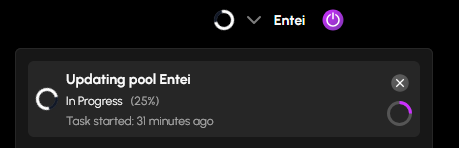
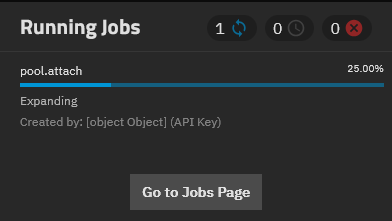
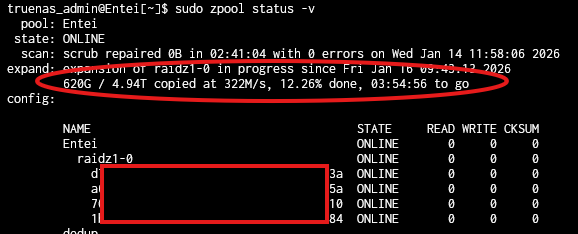
 Hey there, unsure if this is the correct channel to post a suggestion, please direct me elsewhere if not. I was just expanding an existing pool from inside the UI after adding a new drive to my NAS, and after doing that I (wrongly) assumed it would be almost instant to expand the ZFS pool, because it isn't something I have done before. When I did it, I was surprised to see it stay on 25% for a long time, because I didn't know any better, and assumed something had gone wrong/got stuck with HexOS being beta software, which wasn't helped when I checked the TrueNAS interface and the running jobs said it was created by [object Object] which really made it feel like an error had happened somewhere.... After a bit of research I realised how expanding pools actually worked, and could see in the CLI that it was actually working and there wasn't an issue at all. I suspect it being stuck at 25% is an upstream TrueNAS issue, but a warning message that this process will take a long time to copy the data to the new disk (and maybe warn it will be stuck at 25%) within the HexOS dashboard would probably be a good idea to ease the worries of less savvy people who would see that and assume something went wrong, and potentially cause themselves issues by rebooting or something like that. Thanks, loving the software so far and I hope my suggestion can make it just a little bit better, keep it up!
-
1. Frigate
-

Request: Curate Automatic Ripping Machine
KapnKrump replied to Soid's topic in Roadmap & Feature Requests
I emailed the hexos support team mid December about adding ARM as a curated app because I was never able to get it to run on my own... This was the response I got, so I am hopeful! Hello, Thanks for writing us. I've taken the app and passed it on to the app people. It looks like a perfect app for how we all want to automate backing up of our collections. We will look into adding this to our collections. Thank you for supporting HexOS! HexOS Team -
Hey Bud, This is a common point of confusion with Nextcloud, as this is a new framework called AppAPI that was introduced to run "External Apps" (ExApps) for things like AI assistants and more advanced office integrations that run in separate Docker containers for better performance. For these to work, they need a "bridge" called HaRP (Homeland App Runtime Platform). If you are seeing the harp_proxy_host error, it simply means Nextcloud is looking for that bridge and can't find it. Do you need to use the ExApps or just wanting to play around?
-
Any new about it?
-
I have lost access to the email accosted with the account due to a token theft family link attack on Gmail and my acocunt is not recoverable. Is there any way I can change the email and not lose the product I purchased from you
-

Notification: Updates are available for 1 application
Todd Miller replied to Duncan Innes's question in OS & Features
I was in the exact same situation. Five updated for five installed apps. I guess that makes it real easy to decide which apps the updates belong to. I was watching a video from a person who likes to show new apps (mostly under Docker).. He was showing some apps had daily updates including some that were multiple times a day. While I know there are a lot less apps available through TrueNAS, I wonder how they pick what apps to add to their 300+ item catalog. I'm more of a set it and forget it person so I am already bored with all the updates for our curated apps. Also, every app I have now has the This app is experimental and may not behave correctly. tag. Since that wasn't true a couple weeks aga, I wonder if running these updates is enough for the curation process to think the app is now experimental since I didn't do anything but load the curated app and do the updates. Not sure what the value of that message is when it happens to every app. -
Notification: Updates are available for 1 application
Duncan Innes replied to Duncan Innes's question in OS & Features
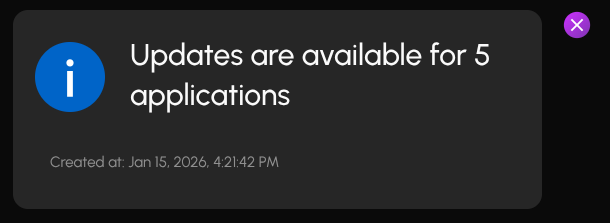
Today for the first time I know which apps require an update: (hint: I only have 5 apps installed 🤨)
-
Very good chance the one drive that is preventing you from booting has gone bad. I would also try to double check if all the cables are connected to the 2nd drive that is not showing up in hopes that it has not gone bad as well.