Search the Community
Showing results for tags 'jellyfin'.
Found 4 results
-
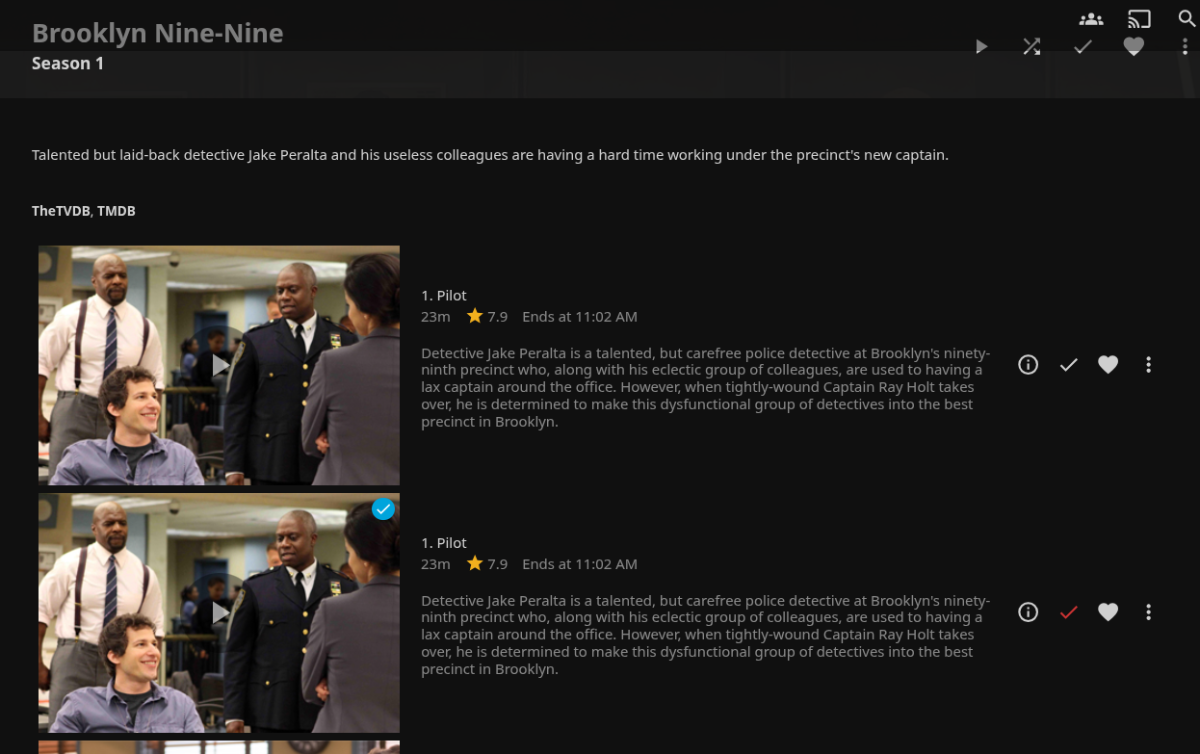
After updating the Jellyfin application through the HexOS interface to v10.11.5, the drive access permissions were reset to default and my custom directories were removed. I re-added the pools back into the apps permissions through TrueNAS, but it did not match exactly to what I used initially (Drive/Media/Shows vs. Drive/Shows). This created duplicate entries for all of my episodes, one version pointing to the newly added directory that plays fine, and another pointing to the old directory that is no longer available to Jellyfin and the files throw an error when you try to watch them. The log has an FFMPEG error saying the directory doesn't exist. I tried a number of troubleshooting steps including refreshing the metadata with direction to replace all existing metadata and I tried deleting the library completely and rebuilding it with the corrected directories then refreshed metadata again. Neither step fixed the issue. Then I went back into TrueNAS and reset the directory access to match my original setup, deleted the existing library in Jellyfin and rebuilt it, and refreshed the metadata. The original episode entries in Jellyfin are working again, but now I have duplicate episodes for the updated directory that no longer exists. Now I just need to delete those new "ghost" episodes. I tried deleting a "ghost" episode with the ellipsis next to the episode and through the metadata manager, but Jellyfin throws an error saying it doesn't have access to that file location. I am out of ideas and am not finding any help elsewhere online. Does anyone have any ideas for how I can clean this up?

-
This may sound like a noob question, but where can I find my server IP? I've looked all over the dashboard and couldn't find anything. I'm running a Jellyfin server if that helps.
-
I recently upgraded my GPU from a GTX960 to a GTX1660 SUPER. After I got the server up and running again I went into the true nas shell and ran NVIDIA-SMI to make sure the GPU is showing correctly and it is. However when I noticed I wasn't transcoding in Jellyfin I checked to make sure the GPU was still set to pass through, and it wasn't. I checked the box and hit update and then I get this error: error FAILED [EFAULT] Failed to render compose templates: Traceback (most recent call last): File "/usr/bin/apps_render_app", line 33, in sys.exit(load_entry_point('apps-validation==0.1', 'console_scripts', 'apps_render_app')()) ^^^^^^^^^^^^^^^^^^^^^^^^^^^^^^^^^^^^^^^^^^^^^^^^^^^^^^^^^^^^^^^^^^^^^^^^^^^^^^^^ File "/usr/lib/python3/dist-packages/catalog_templating/scripts/render_compose.py", line 47, in main render_templates_from_path(args.path, args.values) File "/usr/lib/python3/dist-packages/catalog_templating/scripts/render_compose.py", line 19, in render_templates_from_path rendered_data = render_templates( ^^^^^^^^^^^^^^^^^ File "/usr/lib/python3/dist-packages/catalog_templating/render.py", line 36, in render_templates ).render({'ix_lib': template_libs, 'values': test_values}) ^^^^^^^^^^^^^^^^^^^^^^^^^^^^^^^^^^^^^^^^^^^^^^^^^^^^^^^^ File "/usr/lib/python3/dist-packages/jinja2/environment.py", line 1301, in render self.environment.handle_exception() File "/usr/lib/python3/dist-packages/jinja2/environment.py", line 936, in handle_exception raise rewrite_traceback_stack(source=source) File "/mnt/.ix-apps/app_configs/jellyfin/versions/1.1.21/templates/docker-compose.yaml", line 3, in top-level template code {% set c1 = tpl.add_container(values.consts.jellyfin_container_name, "image") %} ^^^^^^^^^^^^^^^^^^^^^^^^^ File "/mnt/.ix-apps/app_configs/jellyfin/versions/1.1.21/templates/library/base_v2_1_16/render.py", line 59, in add_container container = Container(self, name, image) ^^^^^^^^^^^^^^^^^^^^^^^^^^^^ File "/mnt/.ix-apps/app_configs/jellyfin/versions/1.1.21/templates/library/base_v2_1_16/container.py", line 94, in __init__ self.deploy: Deploy = Deploy(self._render_instance) ^^^^^^^^^^^^^^^^^^^^^^^^^^^^^ File "/mnt/.ix-apps/app_configs/jellyfin/versions/1.1.21/templates/library/base_v2_1_16/deploy.py", line 15, in __init__ self.resources: Resources = Resources(self._render_instance) ^^^^^^^^^^^^^^^^^^^^^^^^^^^^^^^^ File "/mnt/.ix-apps/app_configs/jellyfin/versions/1.1.21/templates/library/base_v2_1_16/resources.py", line 24, in __init__ self._auto_add_gpus_from_values() File "/mnt/.ix-apps/app_configs/jellyfin/versions/1.1.21/templates/library/base_v2_1_16/resources.py", line 55, in _auto_add_gpus_from_values raise RenderError(f"Expected [uuid] to be set for GPU in slot [{pci}] in [nvidia_gpu_selection]") base_v2_1_16.error.RenderError: Expected [uuid] to be set for GPU in slot [0000:01:00.0] in [nvidia_gpu_selection] add_circle_outlineMore info... I've been googling for a few days and I can't find any solution that could help. I made sure the right GPU is showing up in the jellyfin/immich settings, I've rebooted and made sure the GPU isn't isolated in truenas. Anyone run into anything like this?
-
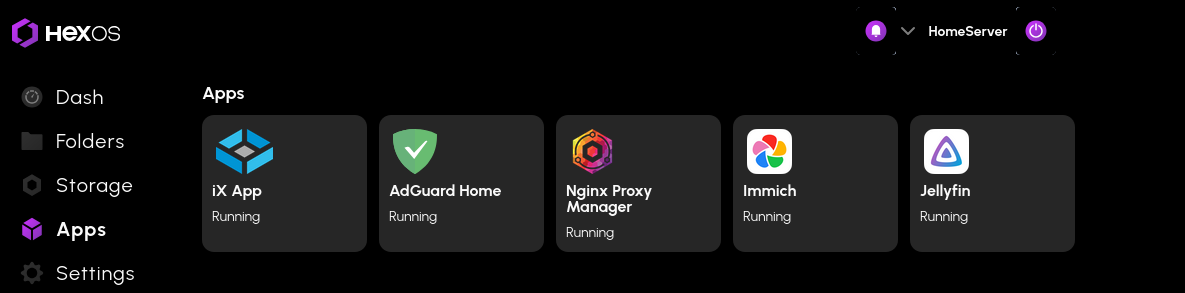
Getting there, these are what I have running at the moment. iX App is owncloud running, that took about 30 hours and 4 different AI chat bots mainly. There wasnt much out there to help with getting it to run. Why owncloud and not next cloud. I had next cloud installed, didnt like it. So I tried owncloud which feels tidier and more refined and it does what I want it to do. I would love to try and make an install app for it (if your listening hexos people and turenas people) . Whats next, reverse proxy so I can access it all securely from the outside. I did have something like jellyfin.home working with https for my local, however the tv doesnt like it. Computers are fine.