jerod
-
Posts
14 -
Joined
-
Last visited
-
Days Won
10





jerod's Achievements






-
 HexOS Gets a Major Upgrade This release introduces an improved Apps experience, new apps, two-factor authentication support, improved GPU support, and Goldeye compatibility. Read more about it on our docsite here at Command Deck Update - December 26, 2025 Also check out our latest blog for even more details! NOTE: This update was applied automatically. You may need to clear your cache.
 -
Another mid-quarter update featuring: - Install Script v2 with interactive questions during app installation to support user preferences (eg. Plex claim code) - Fangtooth Support with full TrueNAS 25.04 compatibility and automatic pool upgrades - Enhanced User Management with better visibility and access to folder permissions Read the full release notes: https://docs.hexos.com/release-notes/command-deck/2025-11-06 NOTE: This update was applied automatically. You may need to clear your cache.
-
Additional Apps We’ve just added Jellyfin, Home Assistant, and qBittorrent! And this is just the beginning, thanks to our new curation process, we expect many more apps to come online soon. Intro to App Curation We've added an interface to the HexOS frontend to make iterating on apps easier and to let the community contribute their own curations. By enabling Dev Mode in Preferences, you'll unlock the Custom Script option for app installs. From there, you can tweak existing install scripts or create new ones then share them with friends or submit them to the official HexOS curation templates. Right now, the feature focuses on streamlining the app install process. Soon we plan to surface installer questions directly in the UI and automate post-install steps (such as in-app setup wizards). That work depends on the in-development Local UI project, we will share more news about this in the future. We'd love your feedback as we refine this, let us know what's working well and where you're running into friction. Official Docs We've launched a documentation site! This new resource brings together everything you need to know about HexOS, including getting started guides, feature documentation, troubleshooting help, release notes, and community resources. Along with App Curation, we are opening the docsite up for community contributions. Learn about how to contribute here. - Docsite contributions - App Curation Folder Wizard Arrives We've extended our simple folder creation interface with a new wizard-driven process that unlocks specialized use cases like encrypted folders and Time Machine backups. With this foundation in place, we're now ready to move forward on bigger features including Snapshots, Replication, and Buddy Backup. First Flight Updates We've made improvements to First Flight, our onboarding experience, to help new users get up and running with HexOS more easily. Key improvements include: - Progress Tracking: When you complete tasks shown in the First Flight modal, it will pop up again to show you which tasks you've completed and what's still left to do - Persistent Banner: A banner now lives at the top of every page, keeping First Flight guidance accessible throughout HexOS This feature is designed to make the HexOS onboarding process a little more intuitive, especially for users new to home server management. --- NOTE: This update was applied automatically. You may need to clear your cache. Help with clearing you cache is available here.
- 86 replies
-
- 25
-

-

-
Thank you all for the responses on this. We had a lot of fun going through them, and we will incorporate the feedback in the next UI pass.
-
Another Command Deck update went live today. This release includes: Fixes to the networking layer for users switching between DHCP and static IP modes Improved performance across the app based on the observability metrics added last release A new queuing and caching layer to handle folder loading for users with a large number of folders, preventing API overload with TrueNAS A fix for a bug that caused folders to appear missing when a private folder user had been deleted Performance work is ongoing. Let us know if you spot anything.
- 13 replies
-
- 11
-
-
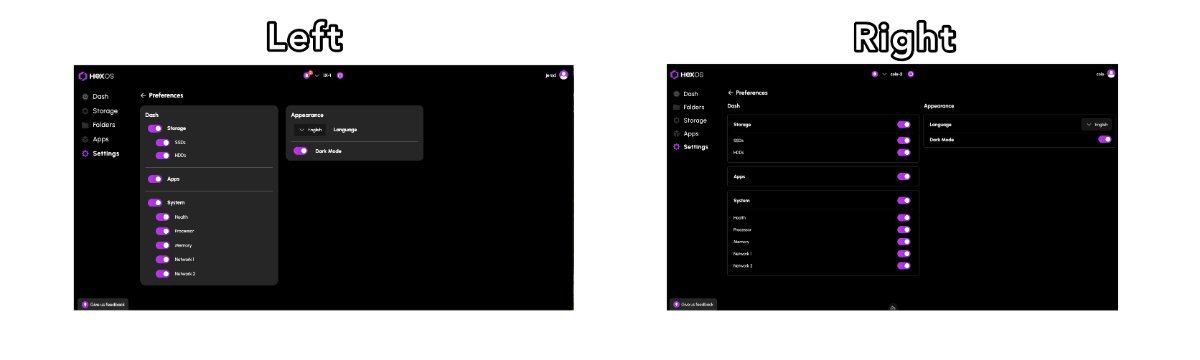
Our designer and developer can’t agree: where should toggles go in the UI?

-
We recently merged a few updates to our command deck to improve observability around request timing. This new instrumentation gives us better insight into performance and will help us identify and resolve issues more precisely. No changes were made to the Command Deck UX in this release. You might already notice things feel a bit snappier 😉 ... let us know.
- 10 replies
-
- 13
-
-
-
Manual Pool Configuration Customize your storage pools with granular control over drive participation. This even includes the ability to create 1-drive pools (without redundancy or expandability). This applies to both our setup wizard and the main storage page itself. Proper warnings are displayed based on the risk profile of the pool being configured. In addition, users that previously "disconnected" (this process is now referred to as "Unclaiming") their server from HexOS can easily reconnect through the setup wizard without being forced to recreate their storage pools from scratch (just click "skip" when on the storage configuration page of the wizard). New Activity Center The Health card has been replaced with Activity. Activity tracks everything you do in HexOS: our custom orchestration, server events, alerts, updates, and dismissals. Dismissed activities are reviewable from the activity archive. Update to TrueNAS SCALE 24.10.2.2 Another benefit of the new activity center is the ability to update the OS running on your local server itself. You will find the ability to update the OS also in the new Activity Center on the Dashboard. User Settings & Preferences Improvements Light or dark theme, preferred language, hidden dashboard cards, these all now sync and persist across browser sessions. The dashboard is yours to shape and customize as you see fit. UI and Stability Improvements Improved card layout and polish across the UI, the password field now supports toggling visibility, username character limit raised to 30, and plenty of behind the scenes stability fixes. Customizable Location Preferences You can now set exactly your performance versus capacity pools, app locations and other storage preferences that allow our one click installs to work. Works across all curated and custom apps. How to Update Updating the Command Deck itself is an action performed by the HexOS development team. User's are not required to perform any action to receive the update. It will appear automatically upon login after it goes live. For users still running the 24.10.0.0 build of TrueNAS SCALE, you will see an "Update Available" notification under the Activity Center once you login. Once you engage the update, do NOT power off your system. Wait for the update to download and restart your server automatically. Your system will automatically reconnect to the Command Deck when complete. The time this process can take will vary based on your Internet connection. Known Issues There is a TrueNAS SCALE bug that affects HexOS users when switching your network configuration from DHCP to Static; manually setting DNS before making this change will prevent the issue; we have a planned hotfix for this as well. Skipping storage pool creation in the wizard allows users to create pools within TrueNAS and they will show up in HexOS; WARNING: we have not tested all pool layouts (or sub-pools either), experiment with great caution.
- 60 replies
-
- 25
-
-
-
jerod changed their profile photo
-
We are releasing a minor update today. Here are the main changes: Improved Setup Wizard Functionality: Enhancements in detecting system details during setup, with additional warnings and error messaging to help identify potential problems. Existing Data: The software now detects existing drive partitions during setup. If any exist, they will be flagged for your attention. Minor UI Improvements: A number of small user interface issues have been resolved to provide a smoother experience (eg. when scrolling through long content on larger displays, the detail panel will remain fixed and visible) You will receive these updates automatically on your next visit to the Command Deck. For those actively connected, there may be a brief moment of downtime to ensure everything is working correctly.
- 37 replies
-
- 25
-
-
-
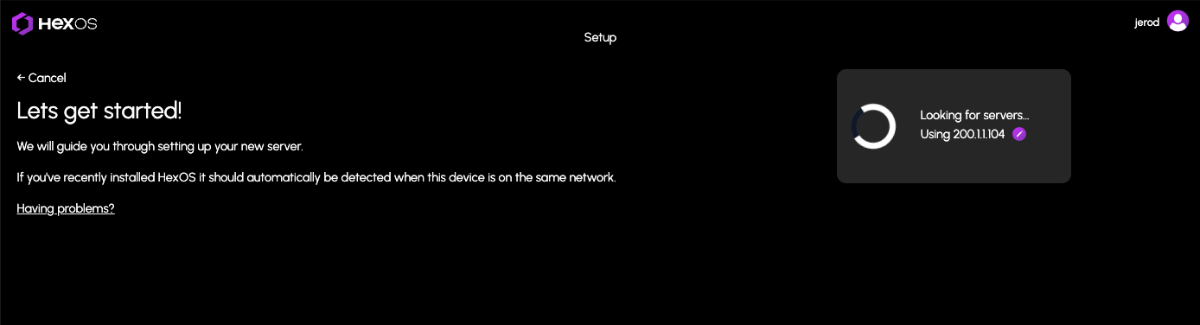
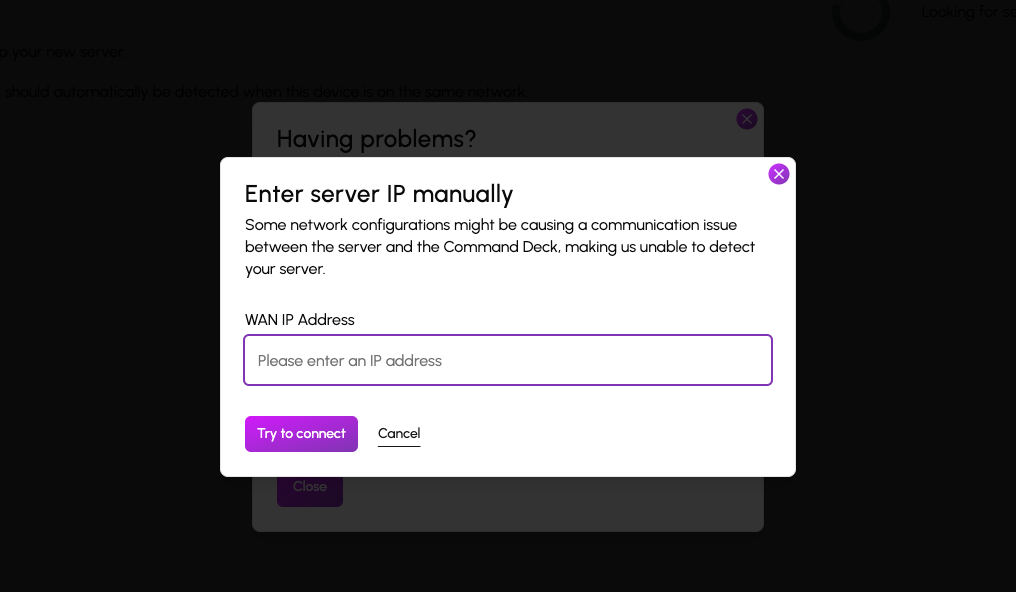
Command Deck Update Notification (01/08/2025) We are releasing an update today. You will automatically receive these changes on your next visit to the Command Deck. For users who are actively connected, please note there may be a brief downtime of minute or two. This update includes an important feature for users who have previously encountered issues claiming their HexOS server due to certain network configurations. These configurations caused communication problems between the server and the Command Deck, preventing automatic server detection after installation due to an IP mismatch. Manual WAN IP Specification You can now manually specify the WAN IP address to assist in the server discovery process when claiming your server. Additionally, we’ve made several minor improvements, including: Additional confirmations for destructive actions to help avoid accidental operations Improved grammar and spelling throughout Clearer instructions for accessing the TrueNAS UI from Settings Better logging to help dev/user experience If you encounter any issues, try clearing your cache first to be sure you are using the latest version: Instructions for clearing your cache
-
We’ve recently made changes that may affect your current authorized session, and as a result, you may find yourself logged out of the Deck UI. Simply log back in, and you’ll automatically pick up the required changes. If you encounter any issues logging back in, it’s likely due to caching. Please follow the instructions below to clear your cache: For Chrome: Open the browser menu (three dots in the upper right corner) Go to "More tools" > "Clear browsing data" Select "Cookies and site data" and "Cached images and files" and click "Clear data" For Firefox: Open the menu (three lines in the upper right corner) Select "Options" > "Privacy & Security" Scroll to "Cookies and Site Data" and click "Clear Data" For Safari: Go to the "Safari" menu > "Preferences" Click "Privacy" > "Manage Website Data" Remove the cached data for the site For Edge (thanks @thethirdhelix) Click Settings (three dot button near upper-right) > then "Settings" Click "Privacy, search and services" > then "Choose what to clear" (next to Clear browsing data now) Tick "Cookies and other site data" and "Cached images and files" > then "Clear now" For additional instructions or if you're using a different browser, you can find detailed steps at How to Clear Your Browser Cache. If you continue to experience difficulties, please share your experience with us on here on the Hub.
- 15 replies
-
- 10
-
-