All Activity
- Past hour
-
 D3strukt0r joined the community
 -
@ThoDC If you haven't already, email support@hexos.com and they will schedule a time to work with you on this. See
- Today
-
 bkotrla changed their profile photo
 -
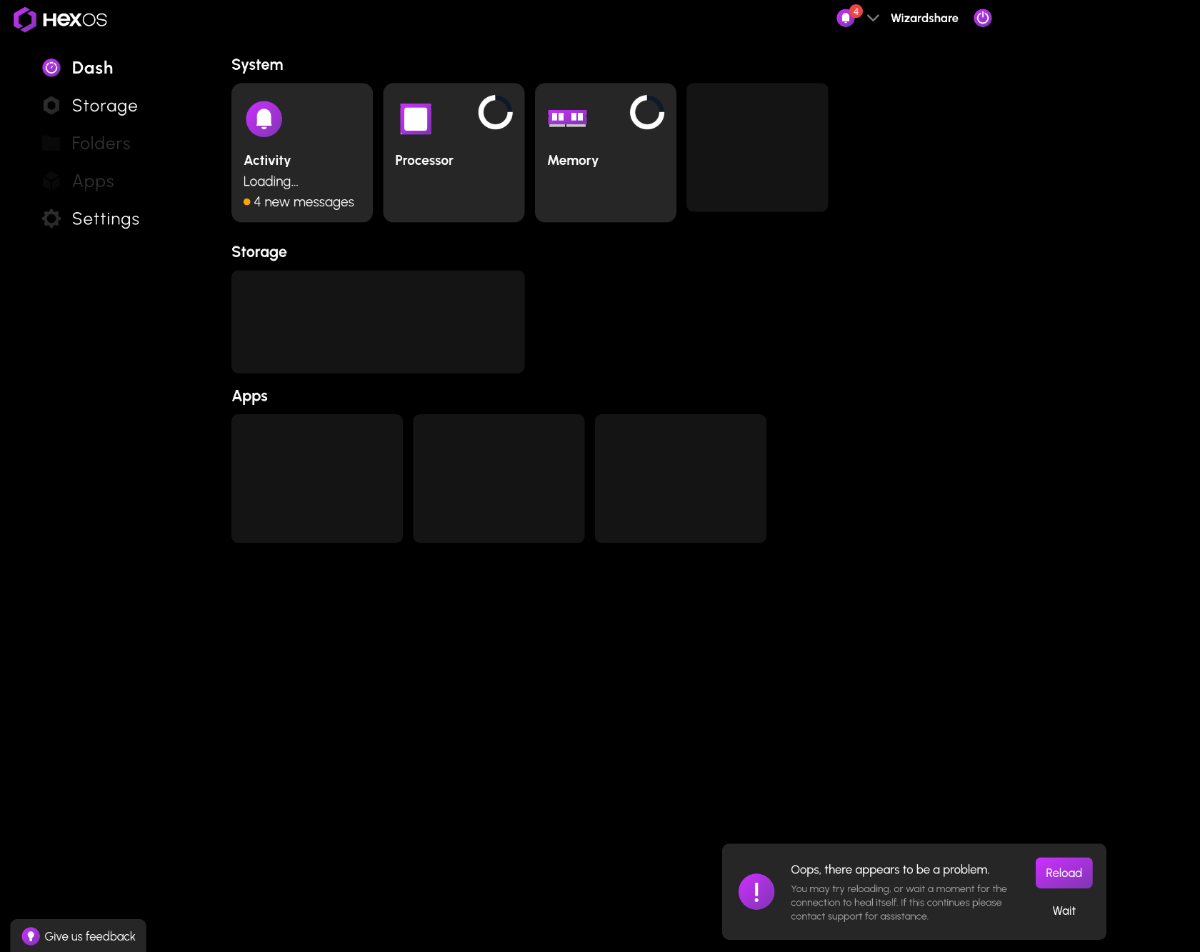
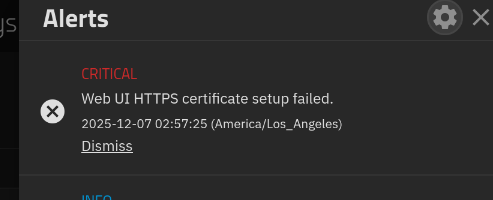
I I did the same thing. A power surge messed up my bootloader and I reinstalled HexOS. I then unclaimed the old session of my server to claim the current one. Everything worked fine and after I found my day old config backup, I restored everything to how it was. All apps working, No data loss. But I think the restore process messed something up between truenas and HexOS. HexOS can tell that it is connected to me server, but cant provide any data. On the truenas side, everything is running, All users were restored, I can access my files and apps. The only thing out of place is this warning: The problem persists even after a restart. My best guess is that when I claimed the new version of my server, the restore must have reverted an authentication id or something to the old version which is now not linked to my account. I am currently on TrueNAS-SCALE-24.10.2.2 and HexOS v0.8.251106 if anyone has a fix or any information.

-
 agb joined the community
 -
 meekosburger joined the community
 -
 k9750 joined the community
 -
 Aligatetcolt joined the community
 -
I did about 8 or 9 times now. And while I have done a lot of volume testing I have everything backed up and continue to treat this experience as a beta test. I'm not sure we are far enough down the path to treat it as anything else. People are still yelling the Immich is broken and how can Eshtek have such a crap product. And when they find out it was actually a TrueNAS change you start to see complaints about how this product can't accommodate this type of change. Then the complaints asking for a conversion process from old to new but that was manual so it didn't work for everyone. So now people have partial changes from several tries and a broken product. Then guys like me who left the safety of the TrueNAS catalog and followed Docker install videos. so I am not making things any easier. I made a joke a while back that go-live would be everyone formatting their systems and all starting from the same point. I said it a second time not to long ago because of this Immich specifically because I wasn't joking anymore. Now I can't see any way around it. How do you explain to the support team everything that got you to the situation your in? They know that firestorm is coming. So I do apologise to responding with this doom and gloom post to your very simple and straightforward request. I sincerely hope that they have a way to help you because I had to reload 1.25 TB of images and almost 10TB of movies (with a few family vacation videos sprinkled in. Honestly, I thought that was why rsync was going to be the answer but I guess nothing is ever that easy. Best of luck, really.
- Yesterday
-
 rbeavor joined the community
 -
 joeman250 joined the community
 -
 Joseph.Garland joined the community
 -
 tcz0g joined the community
 -
 datastack joined the community
 -
Thanks so mush for the guide! just been though this after by boot drive completely died. It seems something has changed and you can now reconnect the folders just by adding the folders in HexOS dashboard. No need to name it with a 1 then change it in TrueNAS. accidentally forgot to add the 1 and it just worked.
-
when you claim a server it will ask you to create storage pools as part of the setup, you can skip that part and use your existing pools
- Last week
-
Just got off a call with a few of the Eshtek guys, they set me straight very quickly. Before I called them, I dove into what others here have done. Here is what fixed the router swap for me: Sign into the TrueNas Scale Web UI. Go to Network: Go to Global Config settings: Change Nameserver1 and IPv4 Default Gateway to the IP address on/of your router. My issue was that I kept changing the NAS IP address to the IP of the NAS, not the router. Essentially, I was signed into my router interface, looked up what the NAS IP address was, and kept changing the Nameserver1 and Default gateway to that IP, when I should have been setting it to the IP of the router. Once that is done, my NAS found the internet again, the HexOS deck found a server and I was set! I had to skip the initial setup in order to prevent wiping the drives, but I was saved. Thanks to Nick and Eric!
-
i have the same issue. What do you mean by skip setup
-
there aren't any risks to unclaiming a server. whenever you reclaim it just be sure to use the skip setup button. seems like you have the bug discussed in this post Hopefully the solution there solves your problem
-
Same problem here and has persisted since installation. Can access TrueNAS via GUI etc. and apps are working as well, but the HexOS deck won't find it. Have you found a solution?
-
Thank you 2nd License bought 😈
-
Thanks for confirming and apologies to anyone that was confused. If anyone bought another license at $199 on accident today, send an email to support@hexos.com and we'll get the difference refunded.
-
This is now showing correctly for me. Thank you!
-
@wvienna @FangerZero can you guys check again and let me know if the discount shows up correctly for you now?
-
No its not over. We are investigating why the correct pricing isn't showing up for users. Stand by.
-
 Bugz changed their profile photo
 -

My 40gbit connection to my NAS for less than $75
macdaddy2012 replied to RobotsNeverDie's topic in Hardware
+1, I'm looking to copy your setup as I'm in the exact same boat: NAS direct attach for video editing. -
Yeah that's confusing so is the holiday sale over? I was going to buy a second $99 package (since I already have a license)
-
I would like to second NemoSadGoose's issue. I had my router die on me, so I swapped to a newer one that I already had setup. I can access the folders/files via my machines, but cannot sign in via the web UI. I keep getting met with the "This Server is not available" page. I then tried to add a new server and enter the new IP address manually, but that did not work. The web UI just sits and "Looking for servers" spins indefinitely. What are the risks to unclaiming a server?
-
Hi, i would like to take advantage of this sale at 99, but when i go to the shop a single license is listed at 199, despite myself already having purchased a license before.
-
Awesome update! Very excited about all of the features mentioned here!
-
Seconding this idea. It isn't a crazy issue, but some of my apps seem to update twice a week and I would rather they just get updated automatically either overnight or a couple days a week or something. I was away for 2 days and had 9 updates to install once and that was annoying.
-
I’ve just installed on a UGREEN NASync DXP2800 (2 bay) and that appears to have worked fine and linked up to the HexOS web ui. I haven’t got the hard drives for it yet but everything else appears to be working. The DXP6800 Pro should be easier to setup as I believe that uses NVME storage for the boot drive instead of the eMMC the two bay uses.
-
This is a good problem.
-
I am in the same boat. $200 for me to just play around with the system I am not sure I would keep using is just to much. I was waiting all year to try and jump in at $99 🙂
-
Emby, Plex and Jellyfin? How are we ever going to chose (setting aside cost for the moment)?
-
Not much if you strip out all the extra add-ons for NextCloud but what fun is that. When I tried to compare them I set the one requirement as 'replace google drive'. With that they seems different but equal. I guess that is because one is a fork of the other. It's probably just level of complexity to install that separated them for me. NextCloud was easier to install but for all but beginners, that isn't really a big deal. Since I don't have much faith in securing either app I just added a few add-ons then stopped them both for a future re-evaluation.