All Activity
- Past hour
-
Hi i just got Hexos up and running with a few apps and wanted to start getting my media server up and running. I installed jellyfinn and the Arr apps and got gluetun setup through dockge. I think now i just need to add gluetun into the networking in the .yml file for each arr app. For the life of me i cant find the .yml files to edit as they are made through hexos curated apps. Any way to access them to add gluetun for networking?
-
All very good info. I already have a 1 Gbit PCI-e Intel NIC on the server because of bad experiences even on Windows with the realtek NIC that is built in😂
- Today
-
Hey, please make sure you motherboard does not have a Realtek NIC, if it does, there's a high change that it will not work. In that case, you should get yourself an Intel NIC. Yes, everything over 32GB for the boot drive is wasted space, since you cannot use the boot drive for anything else then the OS. Apps are typically installed on a pool, this would be your HDD pool if you are not going to create a SSD pool as well. So your 250GB SSD is fine as boot drive, if you don't have a smaller one. Additionally, there is no write cache as other NAS OS might have, there is only a read cache, which doesn't offer a lot or any benefit with your use cases. So no, you don't need a cache drive, and big boot drive is just wasted space. 🙂
-
 cjmauler changed their profile photo
 -
Before I take the plunge to HexOS on my current NAS server: Intel 4770K 24 GB DDR3 RAM LSI M5015 HBA (up to 8 disks) Boot drive: Samsung 850 EVO - 250 GB SSD 8x Seagate IronWolf 2 TB Windows Server 2022 When I move over the disk controller will change to a Lenovo 430-16i LSI 9400-16i SATA / SAS3416 HBA Controller 12G in IT Mode Right now the machine is used as my video and music media server via Emby, and that won't change when i move to HexOS. Services I will add will probably be: Immich NextCloud Is there anything I should be aware of when it comes to the boot drive? I read somewhere a cache drive is recommended and the boot drive should be at least 500 GB. Is that requirement or just a "nice to have"? When HexOS has been installed on the machine can you somehow de-autorize it from the machine so the license can be used on a new machine if needed in the future?
-
 Rufed03 joined the community
 -
 Marco Teuber joined the community
 -
 redbluegreen joined the community
 -
 newdarizum joined the community
 -
 Elektroschocker changed their profile photo
 -
 mvanwilder joined the community
 -
 kshrai joined the community
 -
 PapaSprayz joined the community
 - Yesterday
-
Love this guys content!
-
- 2
-

-

-
 JayTheLegend joined the community
 -
 mco joined the community
 -
 Georgie joined the community
 -
I've reinstalled the OS before removing my server from the deck.hexos.com page. I've been trying to pull in my server into that page, but none of the suggested troubleshooting tips work. The truenas UI works perfectly fine. Does it expect a specific password for the truenas_admin user and that's maybe why it's being found in the deck page?
-

Will 1.0 launch this month as expected?
Blair Young replied to Anthem's topic in Roadmap & Feature Requests
It has gone rather quiet. I thought I would see more general discussion or the odd update. Unless I've missed something the most recent update has been a revision to the blog introducing hex OS local originally published 25th Nov 2025 and updated 23rd Jan earlier this year. I'm not complaining before anyone jumps on me. I've been happily running the beta since originally hearing about it on LTT and couldn't have built my NAS without it (not with my skillset at the time anyway). So far it's been running flawlessly, shares and apps have been a breeze to set up, and the minor jobs I've had to do myself such as setting up a VM in truenas for Homeassistant have been recognised and appear on the Hex OS dashboard. I know it's possible I might have to start again from scratch but fingers crossed there is an update path that doesn't break everything. I have on occasion had to re-adopt the server on the dashboard (probably my fault) but it's only happened a couple of times. To avoid wiping everything I just popped out my drives, re-adopted, shut down, popped the drives back in and everything came back when I restarted. If there isn't a simple update to 1.0 with any luck a similar workaround will prevent data loss. -
BACKUP YOUR DATA!
-
At this point, just using HexOS to create folders, users, install apps, etc. just like normal. Use it both locally and remotely. That's really it. At this point, the main thing we're testing is that it works correctly, navigating you to the local interface when on LAN, and giving you remote access via the deck when away. If you can break your system (non-critical data only), there are a few specific cases we would like to see users test like destroying the pool used by apps (Docker) manually via TrueNAS, then renavigate to deck.hexos.com to see if you can remediate the issue. Obviously not asking anyone with real data on their systems to do this, but for those that have test setups, just beat the heck out it and see what breaks. We test internally pretty rigorously, but there's always edge cases that we can miss and this is the chance to find those as best we can.
-
What does testing all entail? Like is there a checklist to follow, obviously if any thing random comes up, but yeah? Would love to be useful since it sounds like my pools won't be affected. Is there a way to back up settings just in case the OS goes haywire?
- Last week
-
Should be no risk to data loss at all. The biggest risk is getting disconnected from our deck for server administration. That's why we want users to be able to talk to us via discord so that we can quickly remediate those types of problems if they occur. The big switch here initially is going to be authentication. We're moving to key cloak and we set up a more robust infrastructure to enable us to migrate users between production and development environments very easily. While we've done a ton of internal testing on this, we just want to be extra cautious before doing a mass migration of thousands of users all at once. Technically this is still pre 1.0, but the only things that really remain for us are hexos local and some improvements to our health monitoring systems.
-
Can you clarify on the risks with the data on the pools if going in this HexOS Local beta ? Would the worst case scenario be loosing the truenas/hexos install ? Also, is this part of the v1 HexOS realease ? or are we still in v0.xx version ?
-
 An example of it failing to deploy an app
 -
https://youtu.be/WNHJey3_gVk?si=DAf0uftIFAglkhN1
-
I can roll back jellyfin updates while it is deploying so it is on version 1.1.22 now but that hasn't changed anything
-
truenas ui says deploying but they don't, I am at a loss for what to do right now aside from a fresh install which I would prefer not to do. I did to a fresh install of immich multiple times as that was the one I was less concerned with messing with but that doesn;t work either. would prefer not to have to resetup jellyfin.
-
This startes first with immich a few months ago but I did'nt really use it a lot so I wasn't too bothered with it. Then this morning I updated JellyFin (Self Installed but was working flawlessly until this morning) and my server and the same is happening with jellyfin. Any idea as to what is happening and how I can solve it? any help is greatly appreciated
-
We are extremely close to releasing HexOS Local, our solution for accessing/managing your HexOS servers through a locally installed application on your server. Before we roll this out to all current users, we are looking for a handful that are able/willing to help us test the migration process. The requirements are pretty simple: 1) Users that agree to enroll in this early access test will have ALL of their servers migrated (we cannot apply the test to just a single server, so if you have multiple, it's all or nothing). 2) Users must have a discord account as those accepted will be invited to our new discord server for the purposes of bug reporting and support needs. If you are interested in helping us test this, please drop a DM to @mill3000 with the subject "HexOS Local Early Access" and be sure to include your Discord username in the message. Any questions, post them here! Thanks everyone!!
-

TrueNAS Build Going Closed-source
G-M0N3Y-2503 replied to Lee Yat Bun's topic in Coffee Talk (Off-Topic)
The forum seems more for support these days, so it isn't frequented by everyone, and the updates are about quarterly unless something goes seriously wrong. Don't get me wrong I am curious too, but the link is for just the build system. Since HexOS embeds their own files in the OS for their installer I wouldn't be surprised if the answer was they had their own one already. -

TrueNAS Build Going Closed-source
TheFleyd replied to Lee Yat Bun's topic in Coffee Talk (Off-Topic)
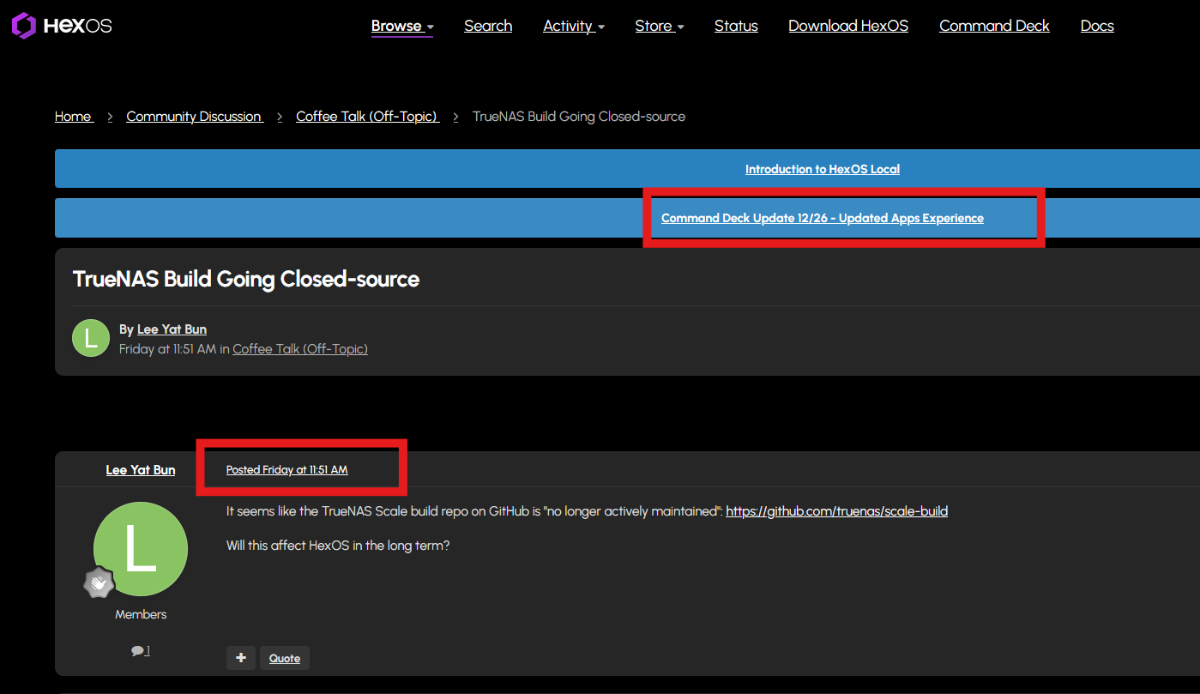
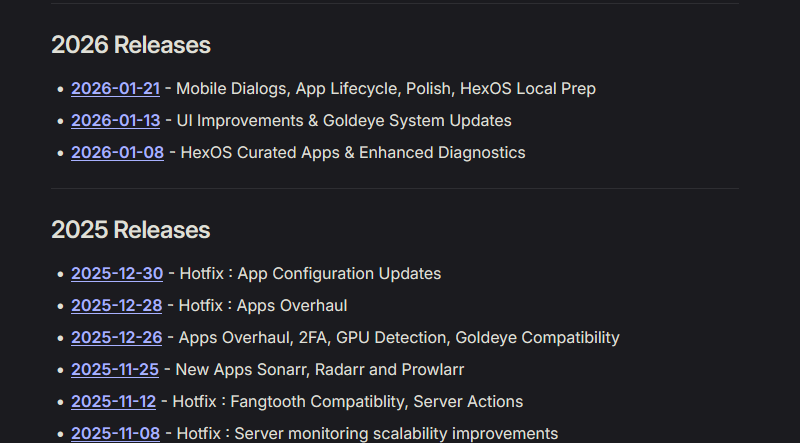
Unfortunately, I have to say I feel the same way... Still hoping i´ve terrible overread something but... considering that even here in the forum, the last change to the “Update Banner” was in December (Attachment 1) a worrying thought is slowly creeping in when il see that there where more regular updates to the Command Deck until January... Did I miss something? If so, I don’t want to have said anything, but atm the release notes are feeding a scary thought (Attachment 2) Until now i´ll just hope the holiday sale wasn’t just the "last" Sale? @Mods @Administrators, don’t get me wrong, but the fact that there hasn’t been a response to such an important question for almost a week is the reason why i´m asking in such a uncomfortable way in hope Fleyd
-
I get this same error when trying to run vendor_service.py.
-
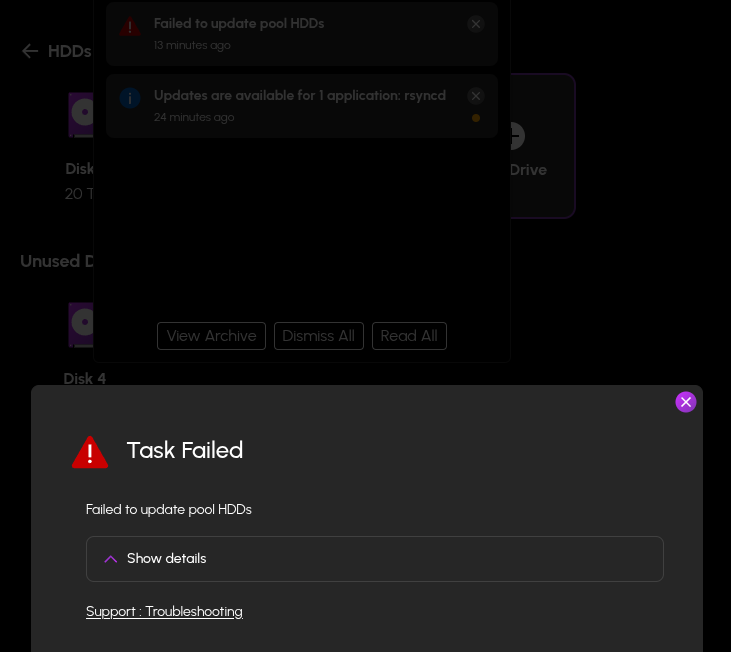
Got the following Error when trying to add a drive to my pool. Context: I have an existing Pool of 3 20 TB hard drives. I had a 4th that I was using for my personal (non-Hexos) server before HexOs was out. I set up the Hexos Server a while back and transferred all my data over to the new HexOs Server. I final decided to take out the 20 TB drive from the old personal server I had and add it to the pool using the Expand option on Hex Os. As seen above I got errors trying to add to the pool but Hexos detects the Drive and says its healthy (as well as all other drives already in the pool) and was working just fine from the old server before moving it to the new one. (All drives where purchased new less than 5 years ago) Thank you for any help you can provide.
-
I feel the same way. I bought into HexOS in the rush to get in on the initial launch price and didn't quite realize the non-local first concept. I only want it to use internet for license, updates, and apps. The cloud command deck is a non-starter for me and almost makes me want a refund. As an extra bonus where I'm definitely a minority on, I'd prefer an option for offline update files even. Then I could have HexOS on my locked down no-internet VLAN and only update/deploy app bundles to it at my leisure. I know many think that goes against the simplicity of HexOS, but I find TrueNAS to be overly complex and would prefer HexOS simplicity for setting up pools and shares along with just having a zip/tarball to upload for updates/apps. I IT all day and don't want to come home to a TrueNAS mess, but also don't want to succumb to a cloud/internet first service. I'll choose TrueNAS complexity over internet requirements especially given the free price tag.
-
+1 for me in ups integration
-
Will 1.0 include quality of life improvements like update all button and betting installed app navigation? Scrolling left to right isn't great. Can we get improved dashboard with charts for app usage and other useful information? I get HexOS is supposed to be easy to use but not having the data available makes it harder since I am left to infer. There should be toggles for what to see on different pages and how detailed.